AI Agents for Supply Chain Optimisation with n8n
From production planning to transport management and CO₂ estimation, discover three agentic workflows to help you optimise your supply chain.
As a supply chain engineer and data scientist, I’m convinced advanced analytics can solve many day-to-day operational problems.
What is the bottleneck? Most of the time, it is the adoption by users.
Supply Chain Planners: “Can we receive the optimization tool outputs by email?”
In User Acceptance Tests (UAT), users consistently request results that integrate with their existing workflows (email, Excel, PowerPoint).
Our solution involves embedding supply chain optimisation analytics into existing workflows using n8n.
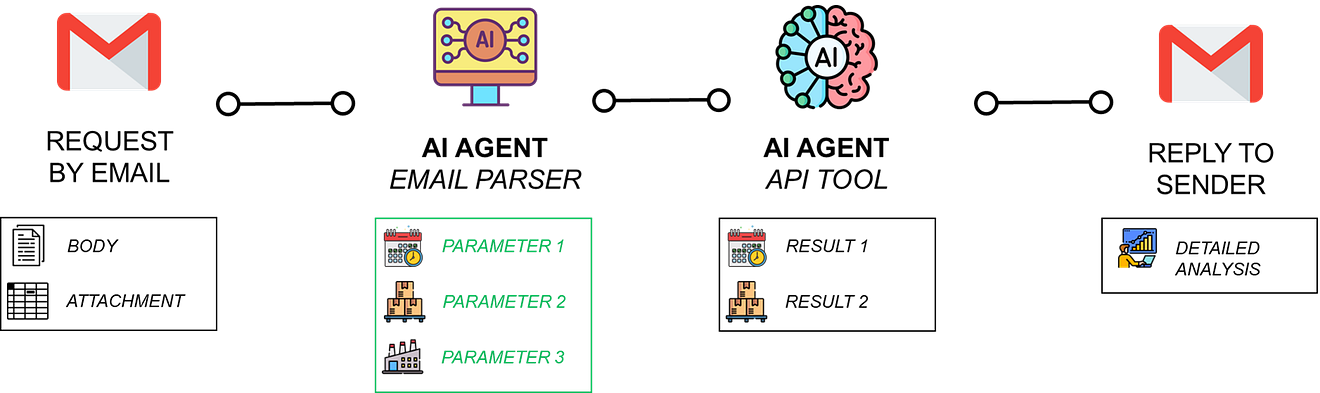
We can connect algorithms, wrapped in API microservices, to user workflows through AI agents equipped with HTTP tools.
The agent reads the request, calls the proper backend and replies with an enriched answer.
In this article, I will introduce three agentic workflows built with n8n:
- A Production Planning Agent that provides the optimal production plan based on orders received by email.
- A Transport Management Agent that computes the optimal route to deliver multiple stores and sends a confirmation by email to customers.
- A Freight CO₂ Emissions Agent that structures shipment data and queries the Carbon Interface API to provide a footprint summary.
These supply chain optimisation workflows can be deployed in your own instance following the tutorials linked in this article.
AI Workflows Connecting Emails to APIs
The idea is to create real value for supply chain operations while integrating seamlessly into existing processes.
To illustrate this approach, we will use the example of a production planning optimisation algorithm, built in Python, that we transformed into an Agentic workflow using FastAPI and n8n.
Production Planning Optimisation Module
Let us imagine you received a customer order with quantities to be delivered over the next 12 months.
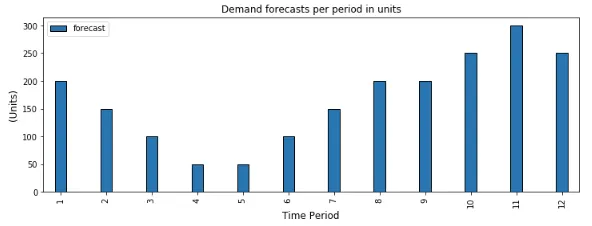
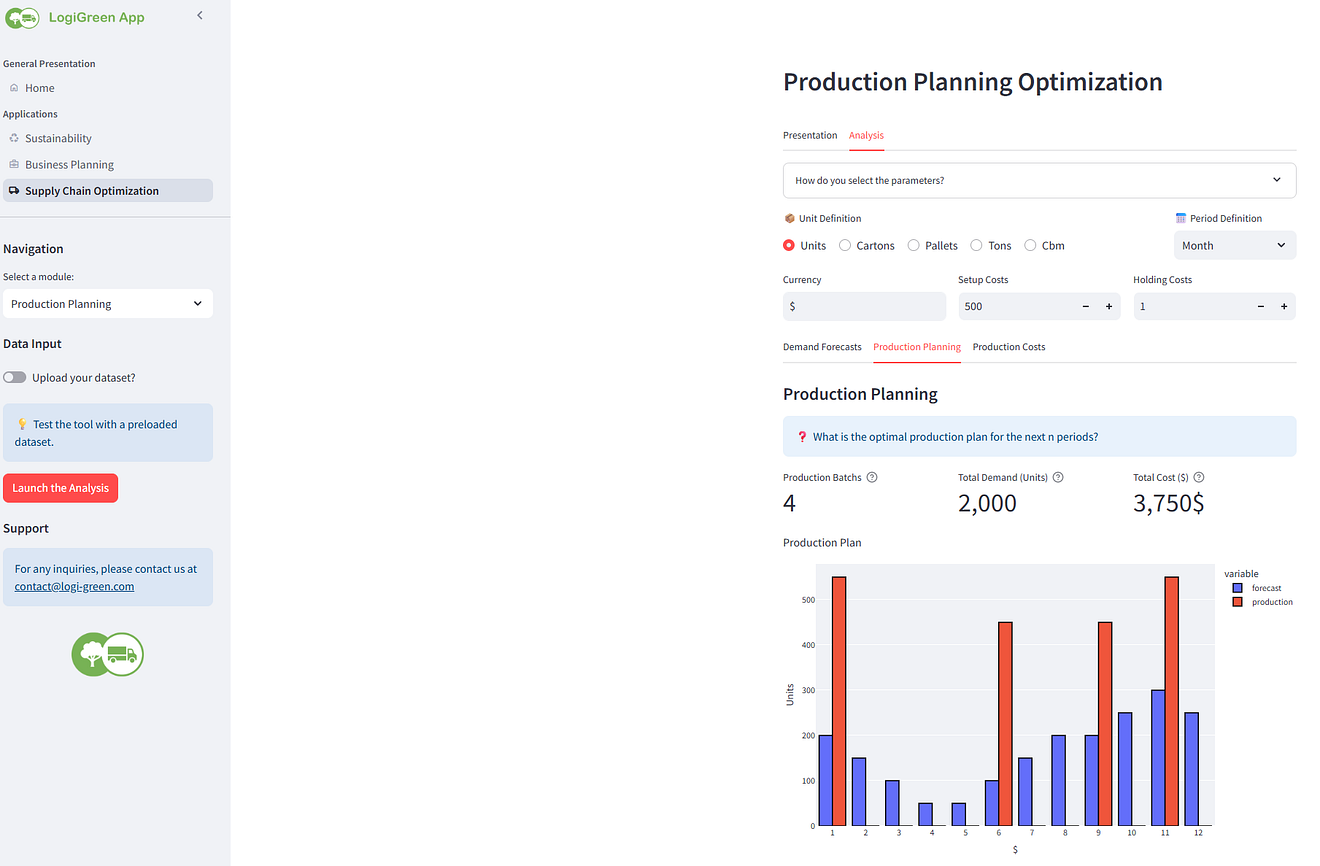
The objective of the planning team is to find the optimal plan to minimise production costs, considering:
- Setup Costs: fixed costs you have each time you set up a production line
Example: 500 $ per production batch - Holding Costs: cost of storage per unit per time
Example: 1 $/unit/month
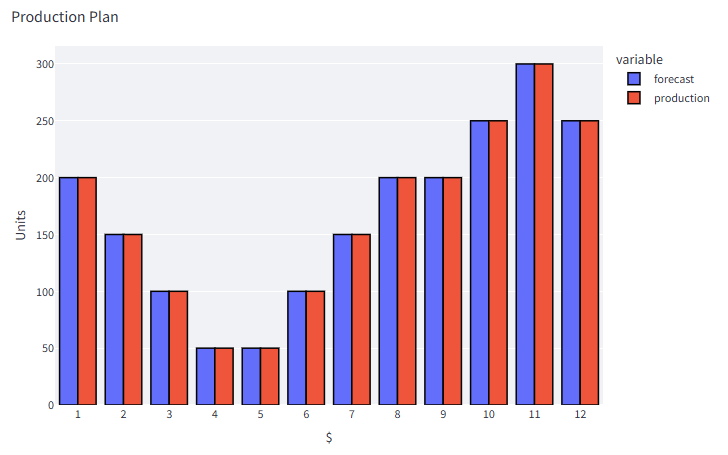
If you produce the exact quantity needed, you will minimise holding costs, but setup costs will explode (12 setups).
On the contrary, if you produce the total quantity in a single batch, you will minimise the setup costs (only one setup), but holding costs will explode.
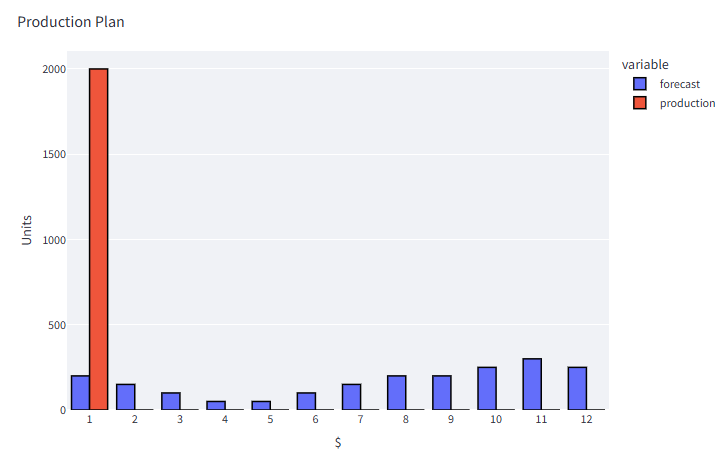
How to find the right balance?
In another article, I explain how I use the Wagner Within algorithm with Python to find the optimal production schedule.
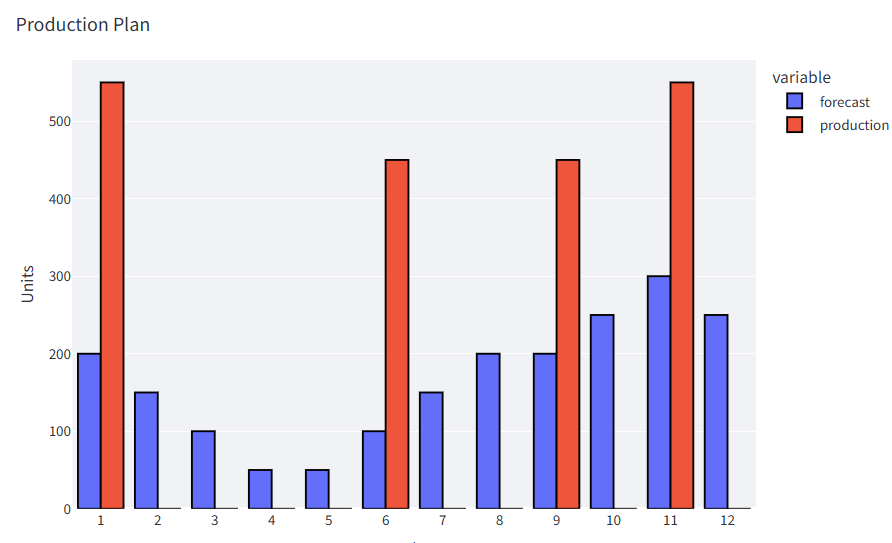
This solution has been packaged in a FastAPI microservice with multiple endpoints
- /upload_prod: this endpoint receives a POST request with the demand dataset included to upload it to the backend
- /launch_plan: this endpoint receives a GET request with parameters like setup cost, holding cost, and time unit
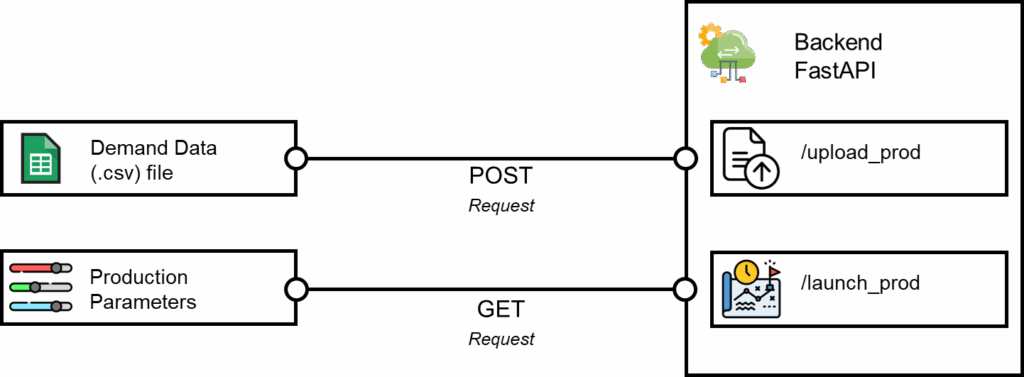
Initially, we aimed to integrate this endpoint with the front end of a web application, where users can upload demand data and select parameters.
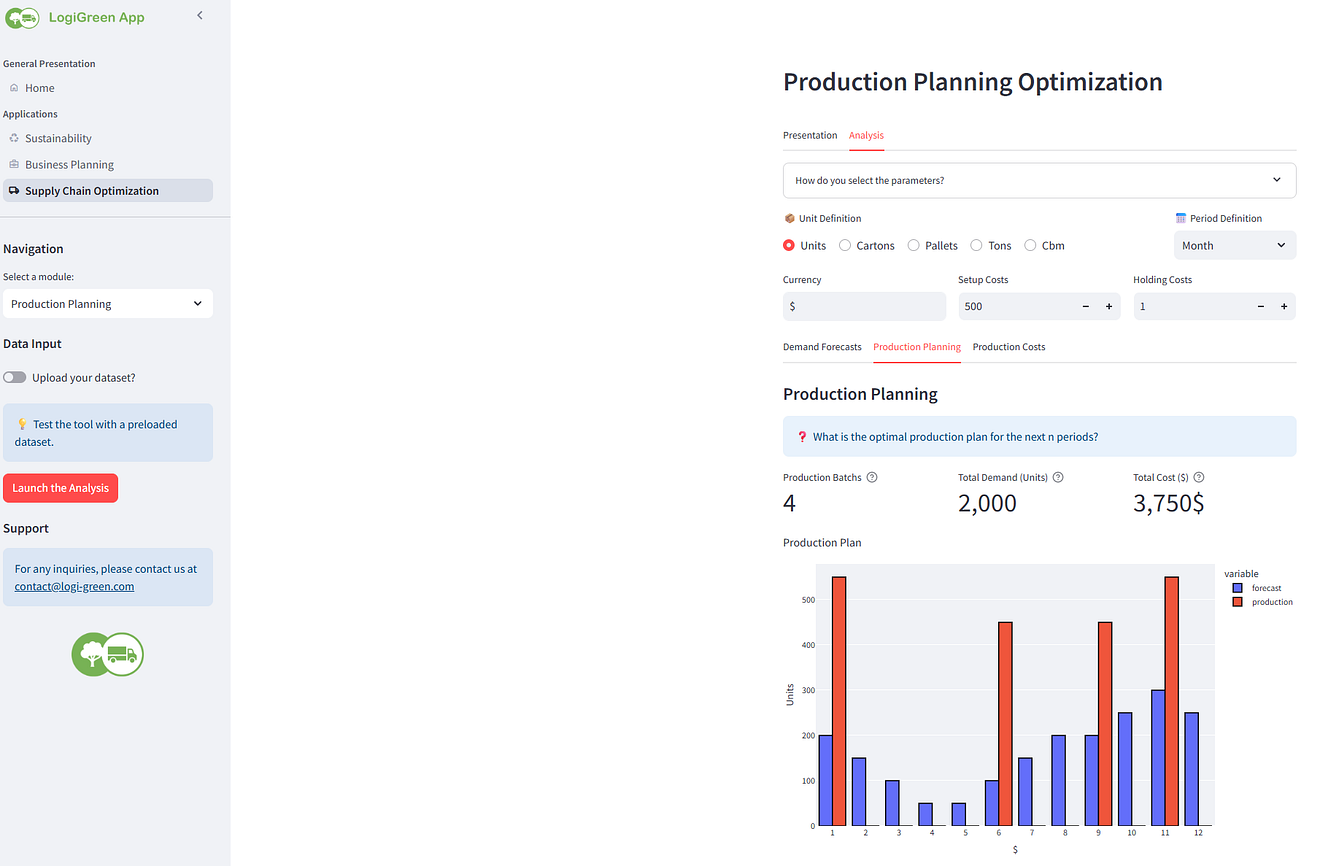
However, production planners wanted something more integrated into their current workflow.
As they received many requests for quotations from the commercial teams by email, they wanted to have the solution connected to a specific mailbox.
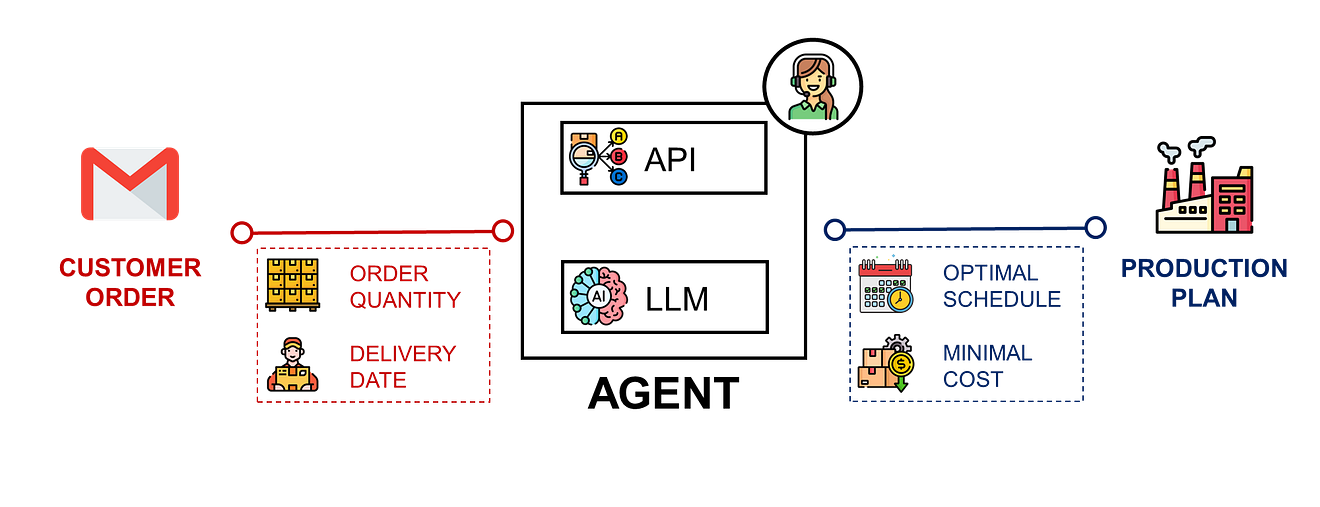
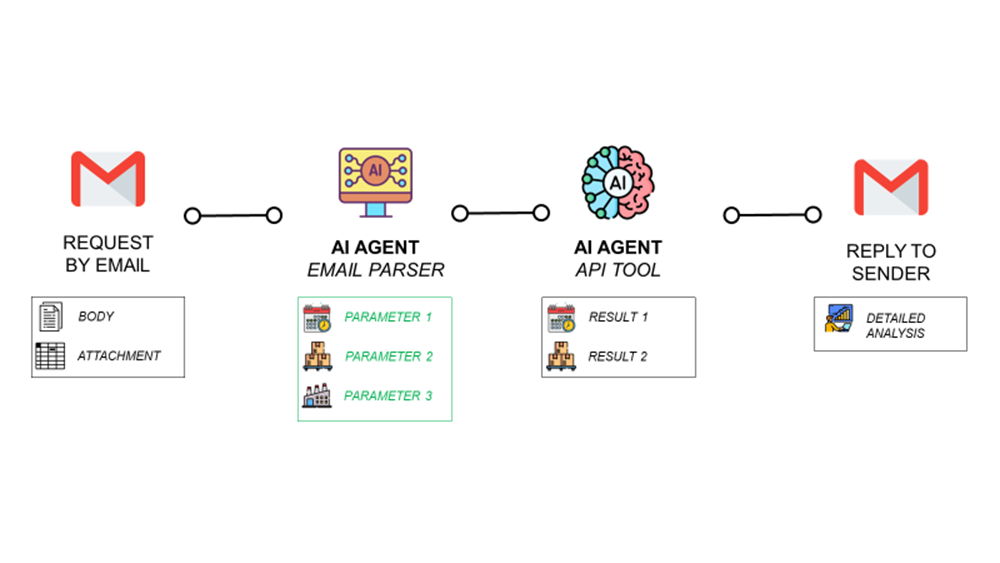
The idea would be to have an AI workflow that extracts the request from the email (including attachment and body), runs the algorithm, and replies with a detailed quote.
We can prototype this with the support of n8n!
A Simple Architecture in n8n
Planners receive requests via email that include details in the body and requested volumes by period in the attachment.
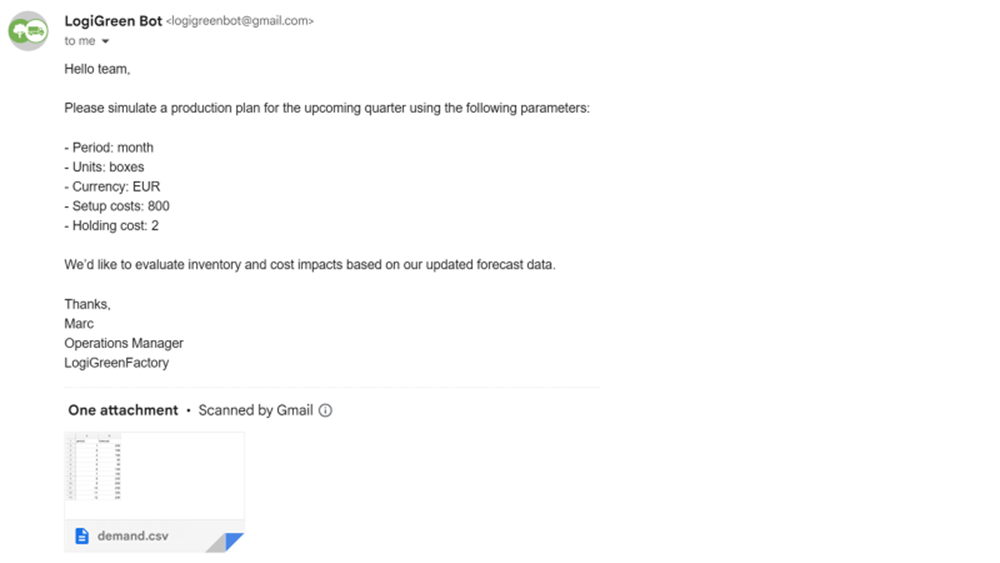
It has been agreed with the commercial team that they will follow a specific format of emails:
- Attachment: demand dataset in (.csv) format
- Email body: production planning parameters like holding costs, setup costs, and unit of measure
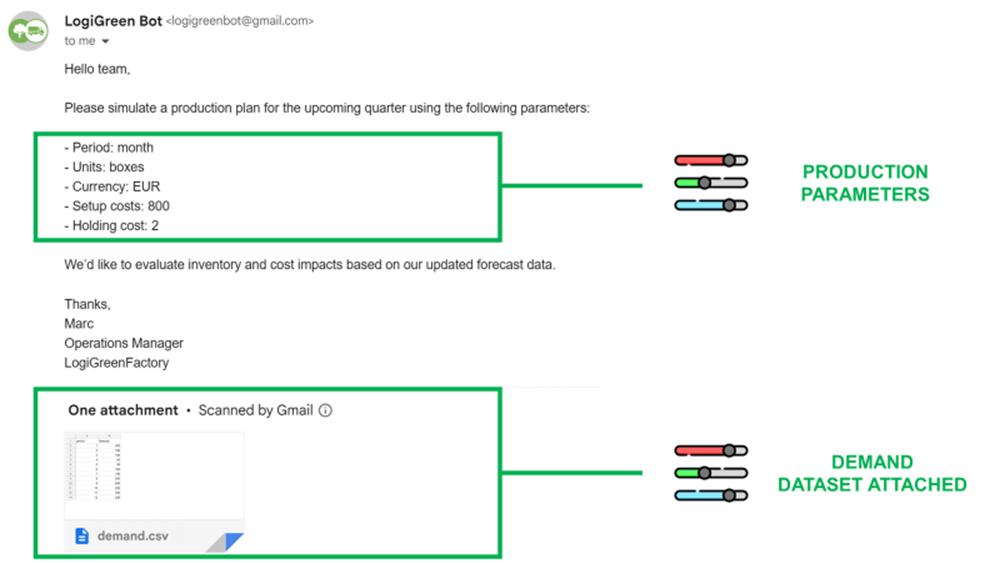
This will be the input of our AI workflow created with n8n.
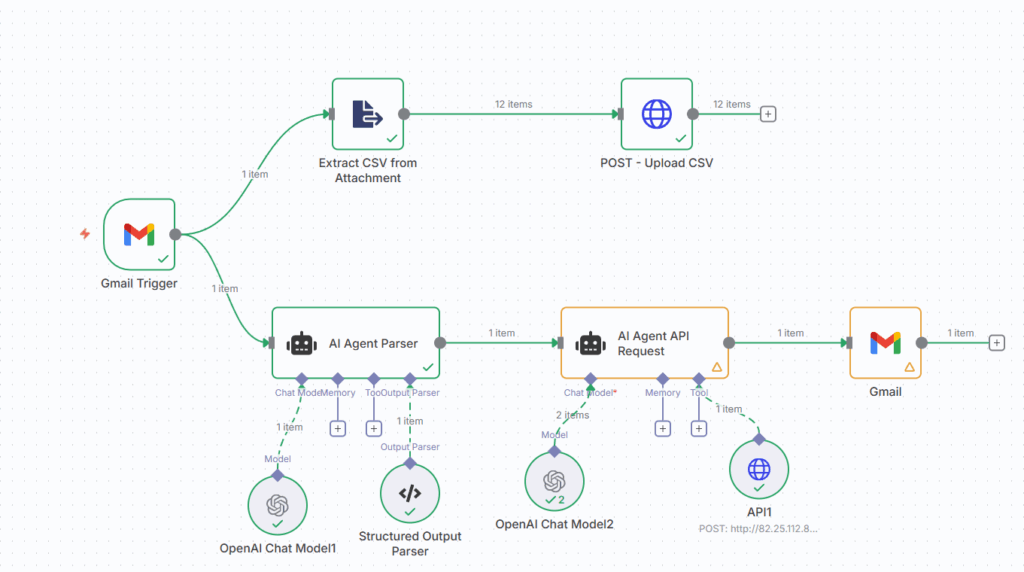
Step 1: Collect Email and Download the Attachment
The GMAIL trigger node collects the email body and downloads the attachment.
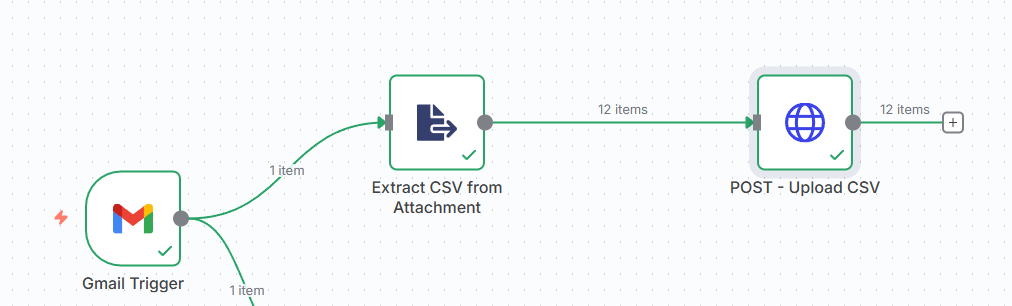
The (.csv) file is converted into JSON and sent via POST request to the backend.
Now that the dataset is uploaded, we can provide the email body to the AI Agent Parser.
Step 2: Collecting the Production Plan Parameters
The AI Agent Parser parses the email content to extract the parameters, which are returned in JSON format.
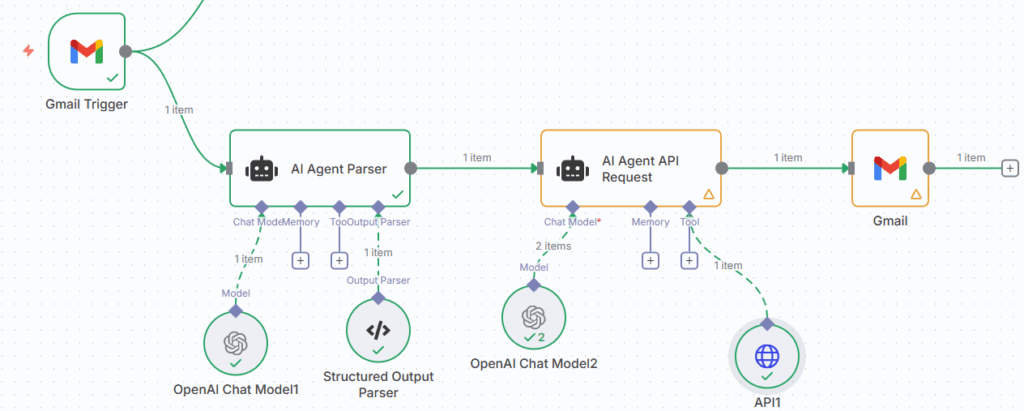
The system prompt details how to parse the email to collect the proper parameters.

The outputs of this first agent are sent to the AI Agent equipped with the API query tool, which is connected to the FastAPI microservice.

I use a minimal system prompt to show this second agent how to use the API we have deployed.
I provide an overview of the parameters available:

I don’t forget to list the outputs of the API:

And I finish with the task expected:

The output is sent back to the commercial manager via email using the last Gmail node.
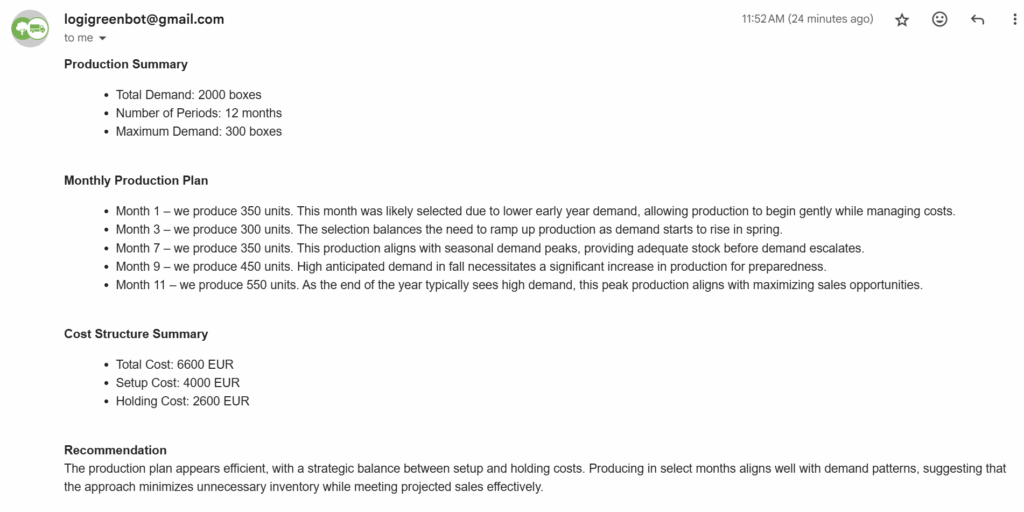
The summary includes a reminder of the input parameters, a detailed description of the production plan, and the overall cost structure that will be used for the quote.
👉 Check the video linked below for a live demo of the workflow
As a supply chain engineer and data scientist, I’m convinced advanced analytics can solve many day-to-day operational problems.
What is the bottleneck? Most of the time, it is the adoption by users.
Supply Chain Planners: “Can we receive the optimization tool outputs by email?”
In User Acceptance Tests (UAT), users consistently request results that integrate with their existing workflows (email, Excel, PowerPoint).
Our solution involves embedding supply chain optimisation analytics into existing workflows using n8n.
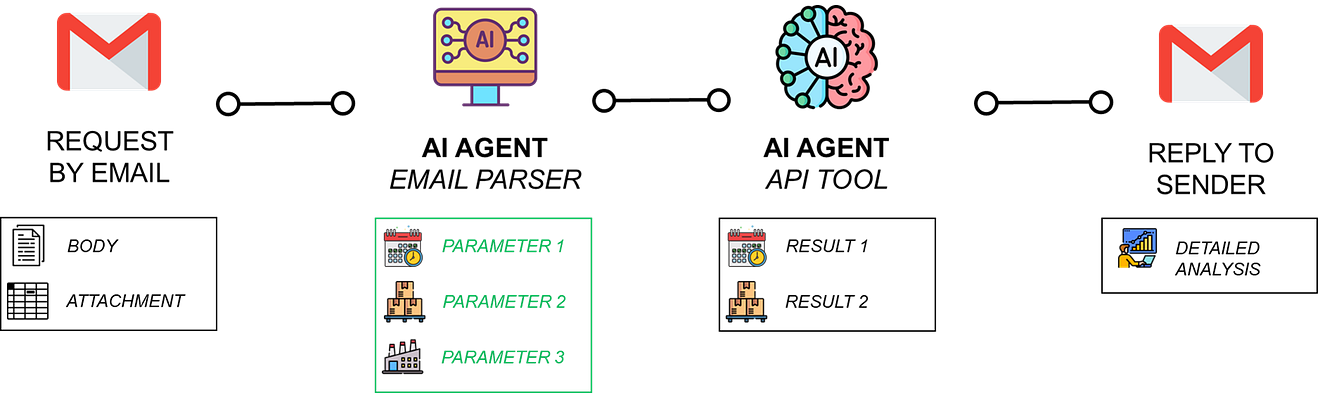
We can connect algorithms, wrapped in API microservices, to user workflows through AI agents equipped with HTTP tools.
The agent reads the request, calls the proper backend and replies with an enriched answer.
In this article, I will introduce three agentic workflows built with n8n:
- A Production Planning Agent that provides the optimal production plan based on orders received by email.
- A Transport Management Agent that computes the optimal route to deliver multiple stores and sends a confirmation by email to customers.
- A Freight CO₂ Emissions Agent that structures shipment data and queries the Carbon Interface API to provide a footprint summary.
These supply chain optimisation workflows can be deployed in your own instance following the tutorials linked in this article.
AI Workflows Connecting Emails to APIs
The idea is to create real value for supply chain operations while integrating seamlessly into existing processes.
To illustrate this approach, we will use the example of a production planning optimisation algorithm, built in Python, that we transformed into an Agentic workflow using FastAPI and n8n.
Production Planning Optimisation Module
Let us imagine you received a customer order with quantities to be delivered over the next 12 months.
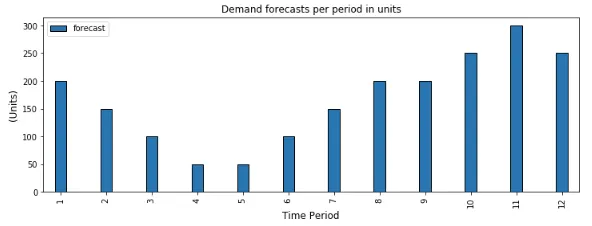
The objective of the planning team is to find the optimal plan to minimise production costs, considering:
- Setup Costs: fixed costs you have each time you set up a production line
Example: 500 $ per production batch - Holding Costs: cost of storage per unit per time
Example: 1 $/unit/month
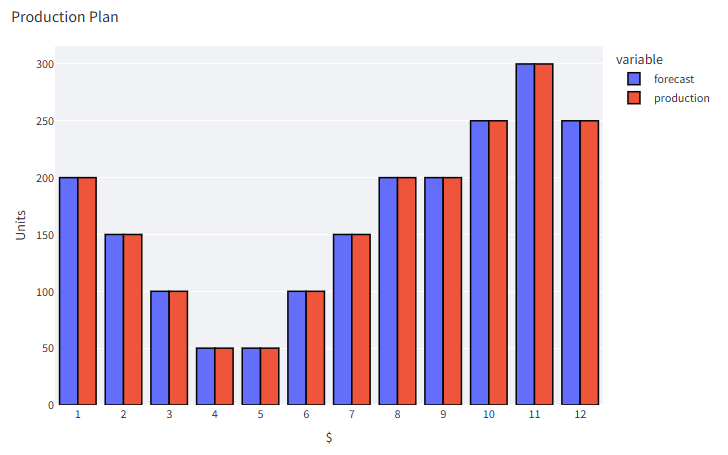
If you produce the exact quantity needed, you will minimise holding costs, but setup costs will explode (12 setups).
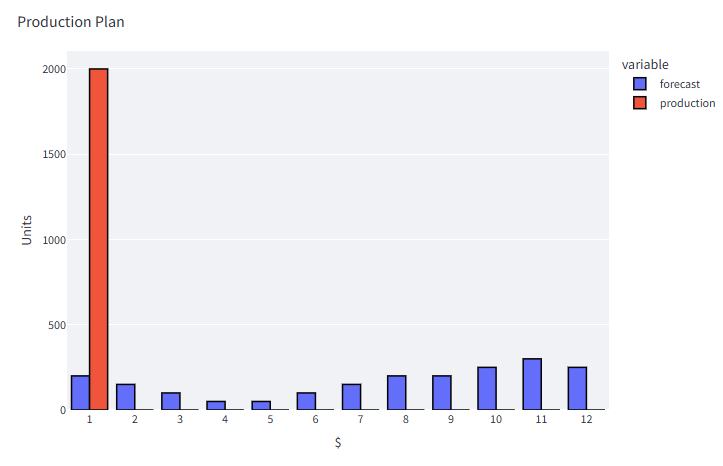
On the contrary, if you produce the total quantity in a single batch, you will minimise the setup costs (only one setup), but holding costs will explode.
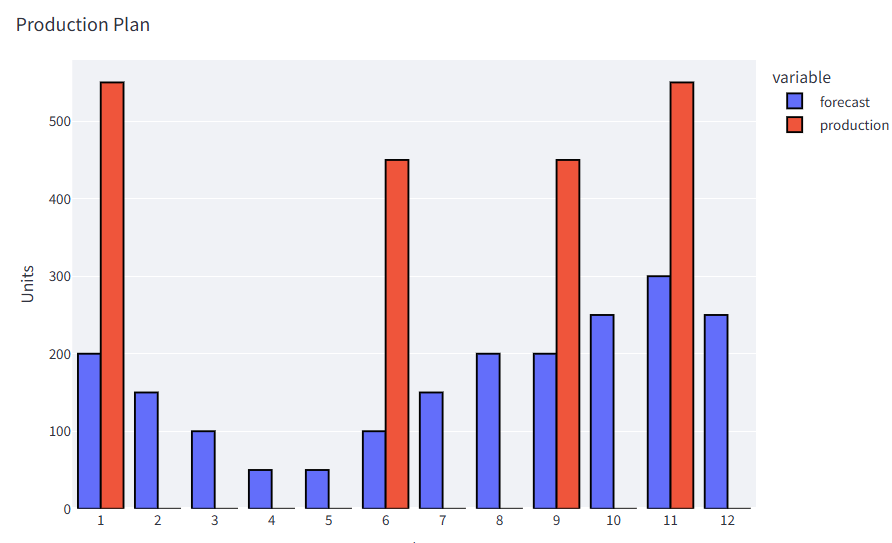
How to find the right balance?
In another article, I explain how I use the Wagner Within algorithm with Python to find the optimal production schedule.
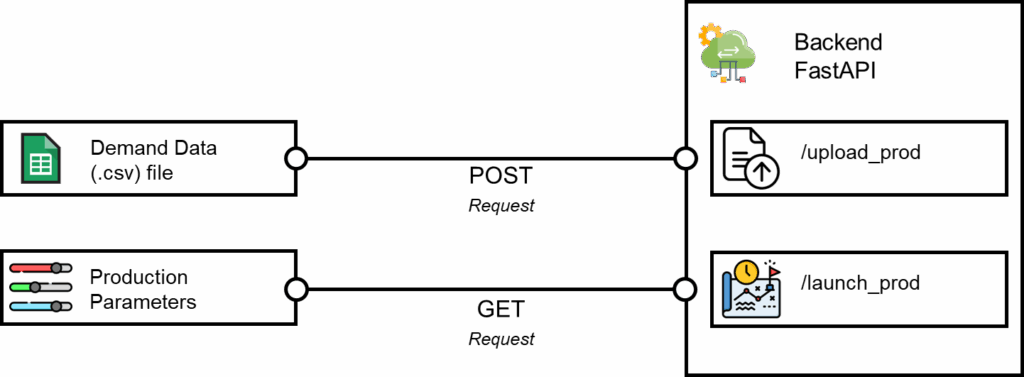
This solution has been packaged in a FastAPI microservice with multiple endpoints
- /upload_prod: this endpoint receives a POST request with the demand dataset included to upload it to the backend
- /launch_plan: this endpoint receives a GET request with parameters like setup cost, holding cost, and time unit
Initially, we aimed to integrate this endpoint with the front end of a web application, where users can upload demand data and select parameters.
However, production planners wanted something more integrated into their current workflow.
As they received many requests for quotations from the commercial teams by email, they wanted to have the solution connected to a specific mailbox.
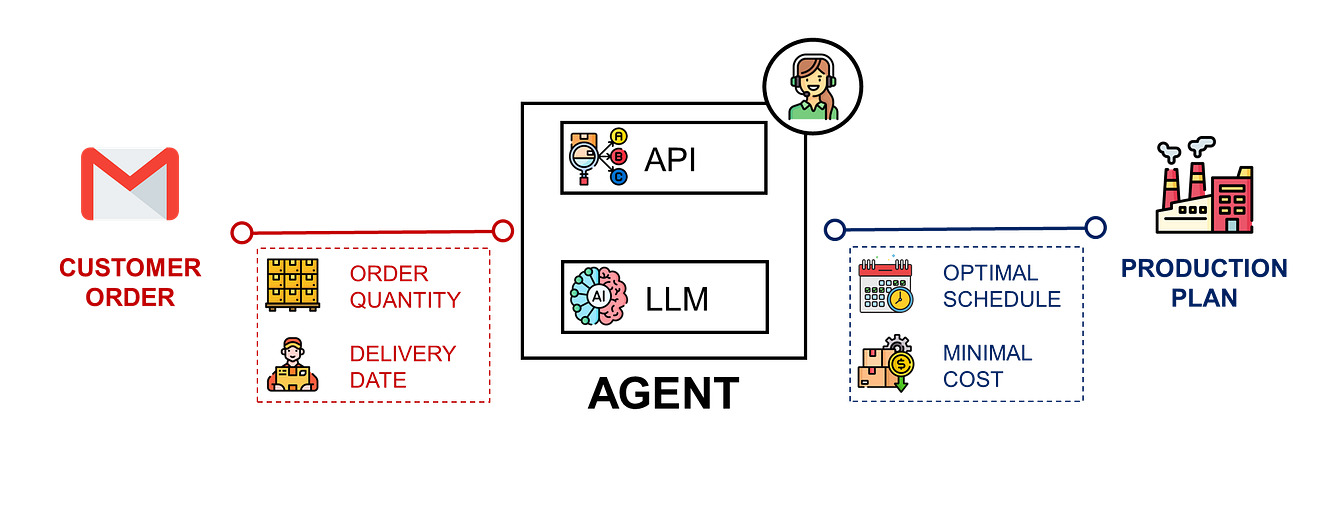
The idea would be to have an AI workflow that extracts the request from the email (including attachment and body), runs the algorithm, and replies with a detailed quote.
We can prototype this with the support of n8n!
A Simple Architecture in n8n
Planners receive requests via email that include details in the body and requested volumes by period in the attachment.
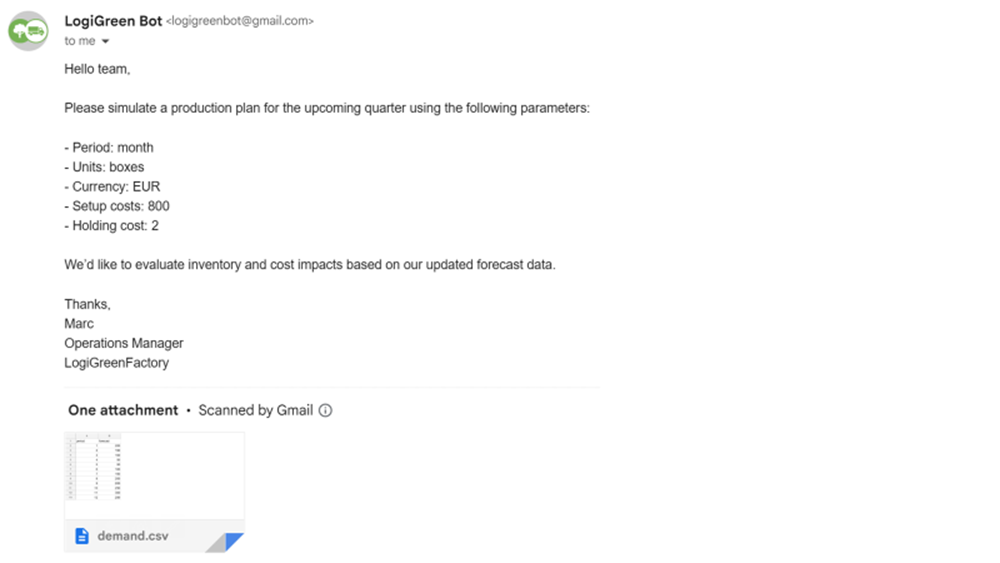
It has been agreed with the commercial team that they will follow a specific format of emails:
- Attachment: demand dataset in (.csv) format
- Email body: production planning parameters like holding costs, setup costs, and unit of measure
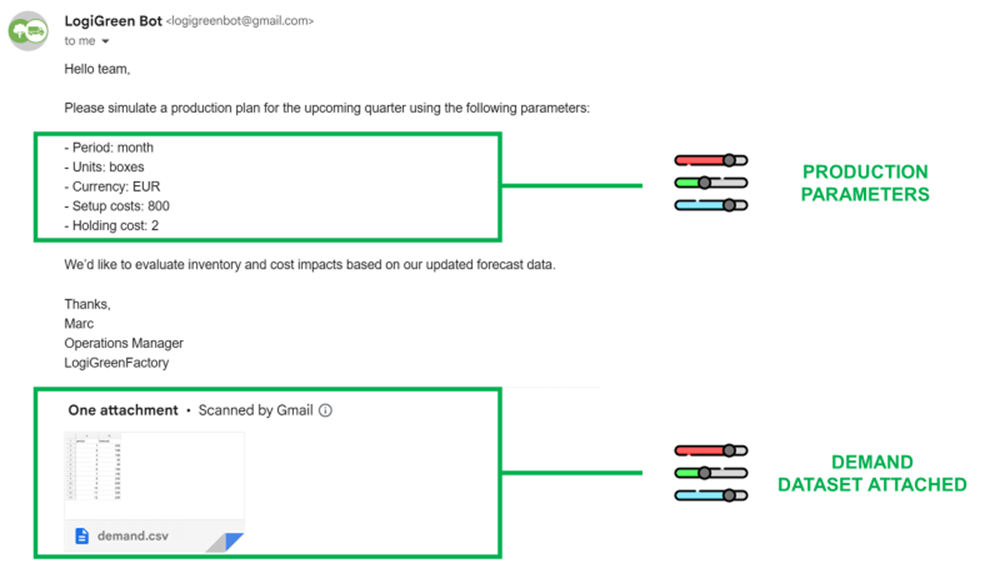
This will be the input of our AI workflow created with n8n.
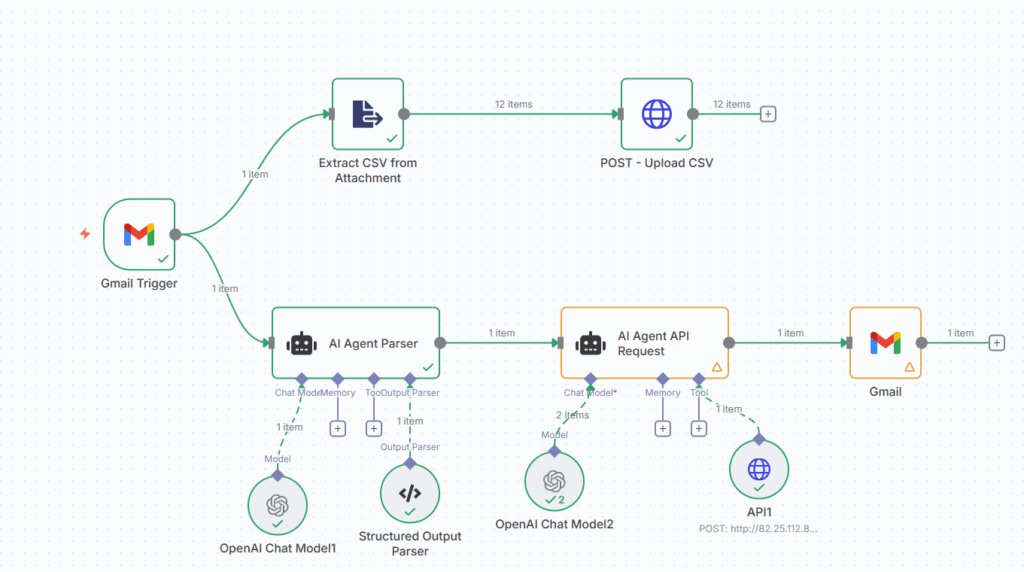
Step 1: Collect Email and Download the Attachment
The GMAIL trigger node collects the email body and downloads the attachment.
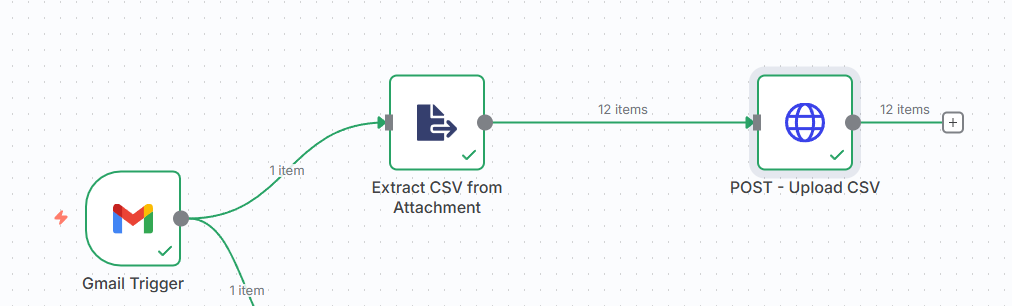
The (.csv) file is converted into JSON and sent via POST request to the backend.
Now that the dataset is uploaded, we can provide the email body to the AI Agent Parser.
Step 2: Collecting the Production Plan Parameters
The AI Agent Parser parses the email content to extract the parameters, which are returned in JSON format.
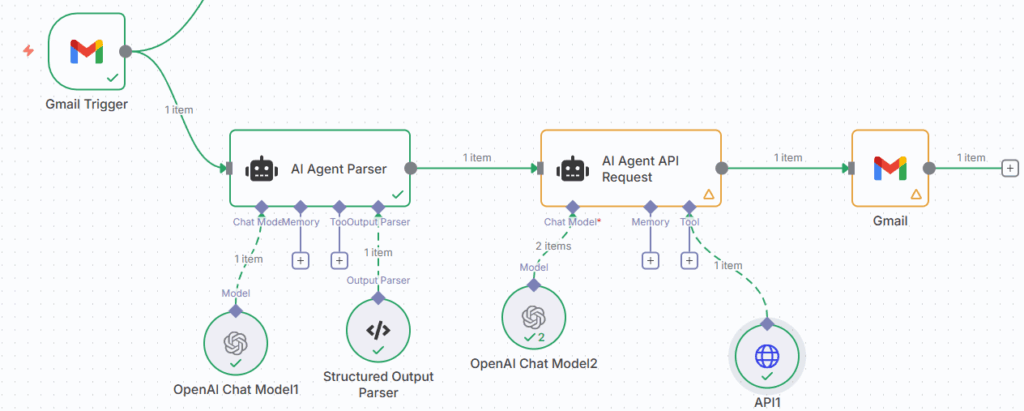
The system prompt details how to parse the email to collect the proper parameters.

The outputs of this first agent are sent to the AI Agent equipped with the API query tool, which is connected to the FastAPI microservice.

use a minimal system prompt to show this second agent how to use the API we have deployed.
I provide an overview of the parameters available:

I don’t forget to list the outputs of the API:

And I finish with the task expected:

The output is sent back to the commercial manager via email using the last Gmail node.
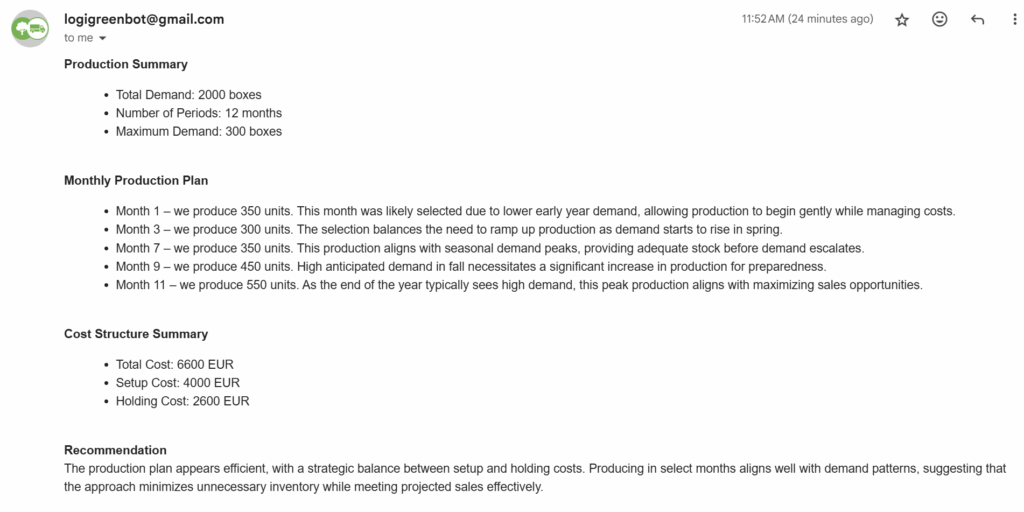
The summary includes a reminder of the input parameters, a detailed description of the production plan, and the overall cost structure that will be used for the quote.
A Proof of Concept Validated
This simple workflow has been deployed for the last 12 weeks with a nearly flawless execution.
Using n8n to prototype it helped us to understand how LLM can interact with complex optimisation algorithms quickly.
In the next section, I will detail how we replicated the same framework for external APIs, providing us with access to infinite optimisation solutions.
AI Agents for Transportation Planning
As the first project involved a FastAPI microservice developed by us, we wanted to experiment with the use of agentic workflows with external APIs.
For a transportation company based in the Netherlands, we first implemented a simple (non-agentic) workflow to calculate driving times and distances using the Open Route Service API.
Could we improve the user experience by adding an AI layer on top?
Later, we decided to add two AI agents to connect them to the mailbox of the admin teams that manage shipment requests.
What this agent solves
The primary challenge for small and medium-sized transportation companies is that they still receive most requests via email, as shown below.
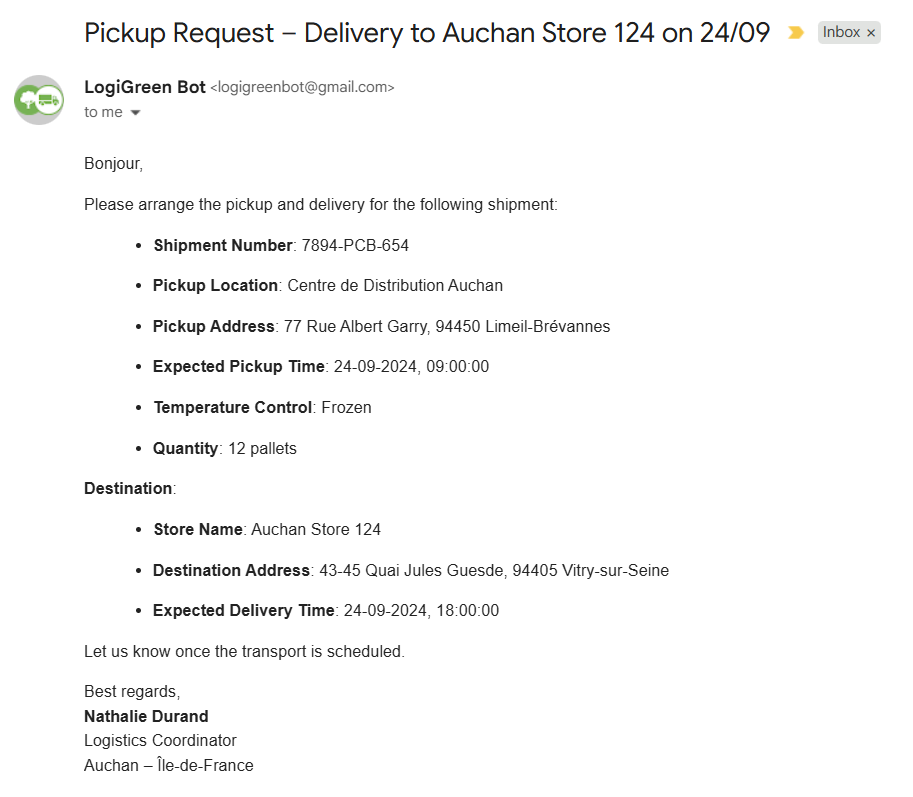
Admin teams must copy and paste addresses into maps, check drive times, and send confirmations back to customers.
These parameters will also need to be manually entered into the system for recording.
How can we automate this?
This agent turns a customer email into a validated route and a professional confirmation reply, while logging every detail to Google Sheets for traceability.
How does it work?
Admin teams receive pickup requests via email (as shown in the example above) that include details in the body.
This will be the input of our AI workflow, created with n8n, that includes two AI Agent nodes:
- AI Agent Parser is parsing the email to extract the shipment information (pickup location, delivery location, pickup time …)
- AI Agent Reply that uses the shipment parameters along with the distance and time to send shipment confirmation
Between these two agents, you have a set of nodes to query the Open Route Service API to collect and record distances, GPS coordinates and driving time.
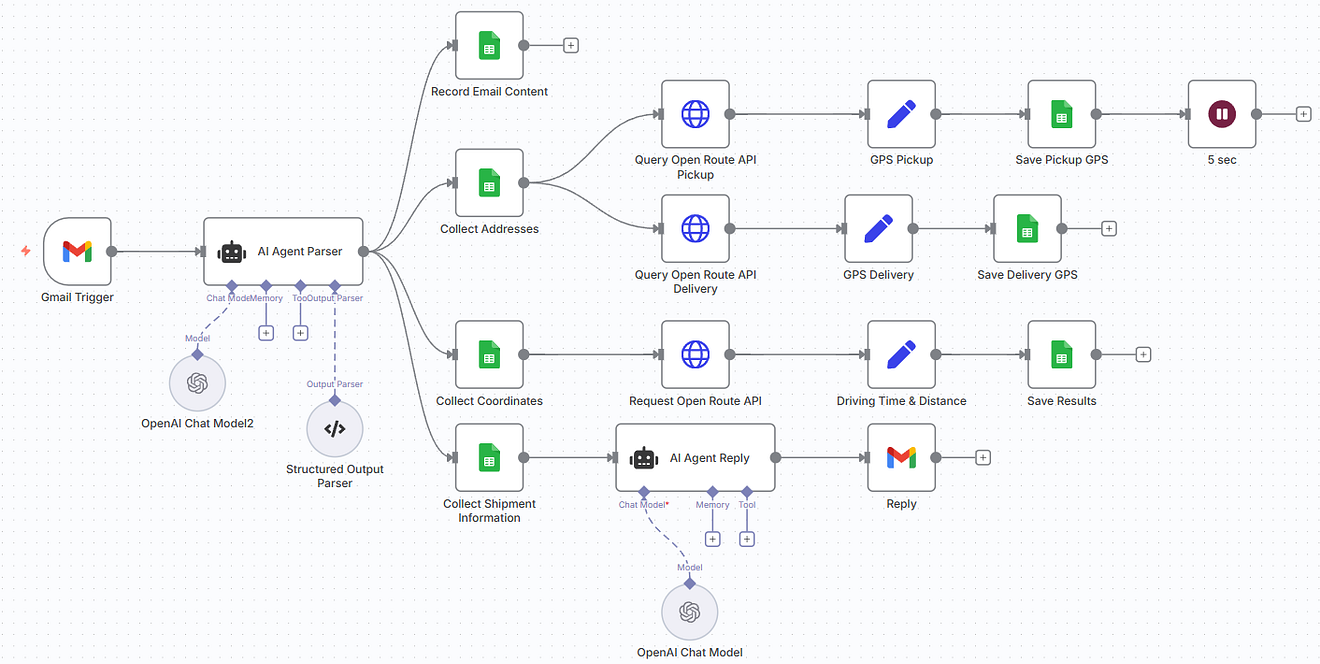
- Gmail Trigger captures a new shipment request.
- AI Agent (Parser) extracts structured fields (pickup/delivery, time windows, temperature control, contact).
- Google Sheets stores the request.
- The Open Route Service geocodes addresses, then computes driving distance and ETA (using the HGV profile).
- AI Agent Reply drafts a confirmation that repeats the key details.
- Gmail sends the confirmation back to the requester.
Step 1: Parse the parameters from the Email
The GMAIL trigger node collects the email body that is sent to the AI Agent Parser.
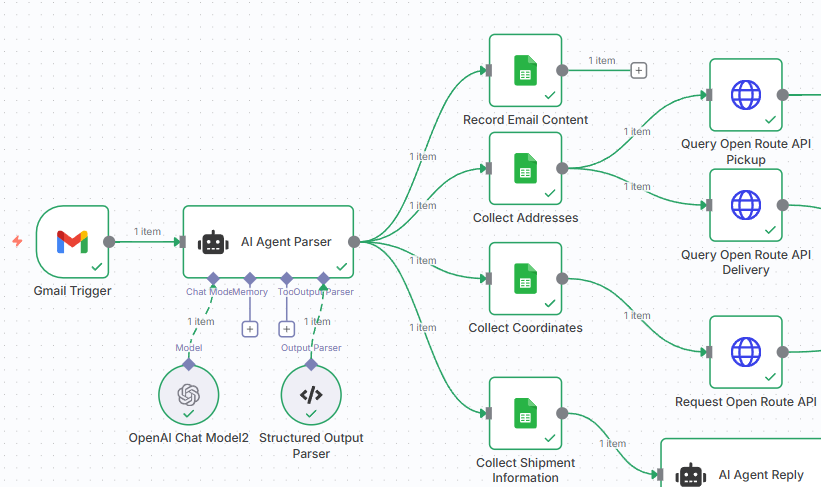
We use the system prompt to instruct the agent on how to parse the email to extract the shipment information.
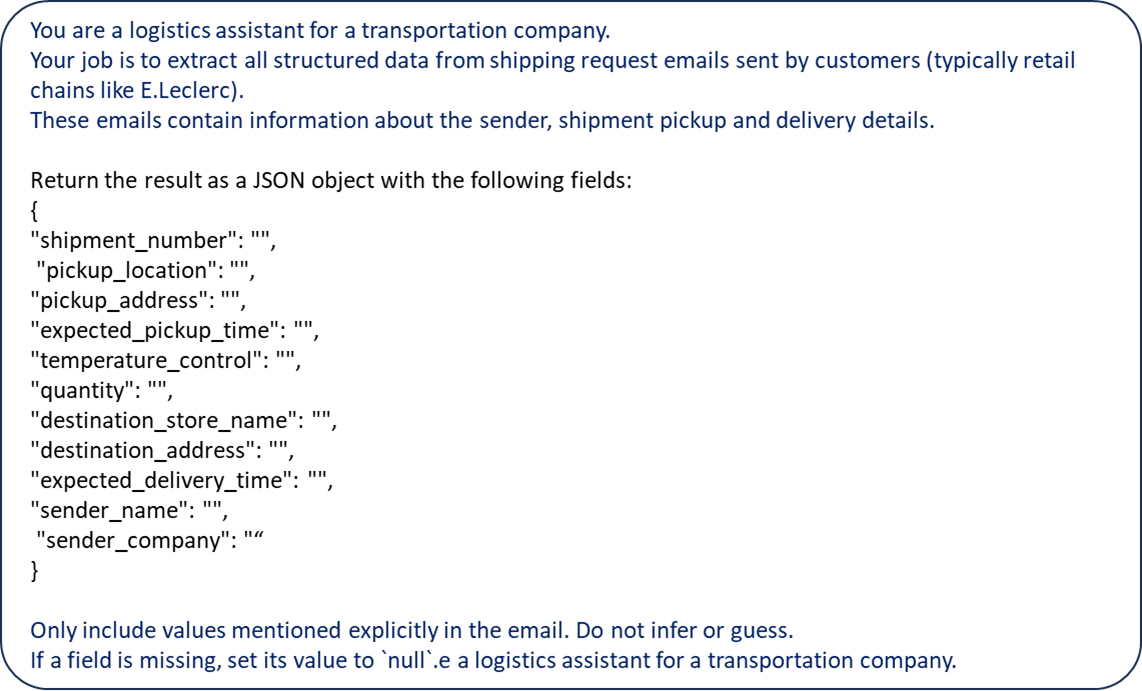
We can then collect, in JSON format, all the parameters included in the email.
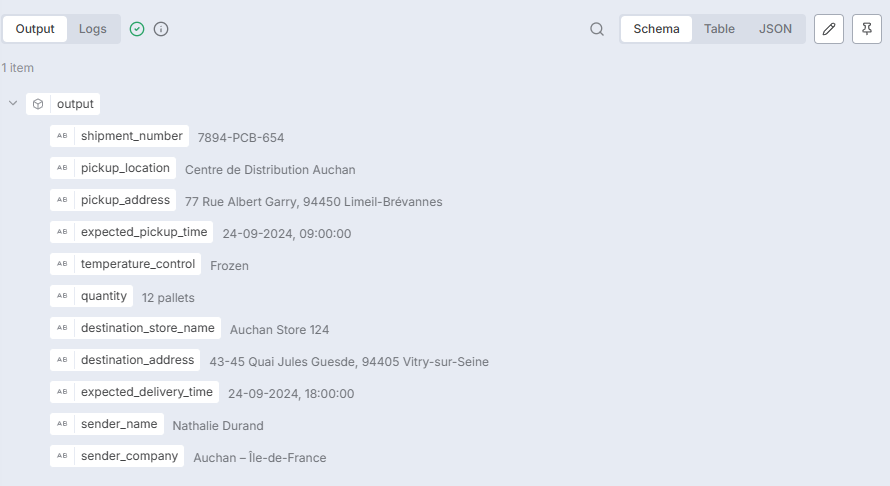
Step 2: Querying the Open Route Service API
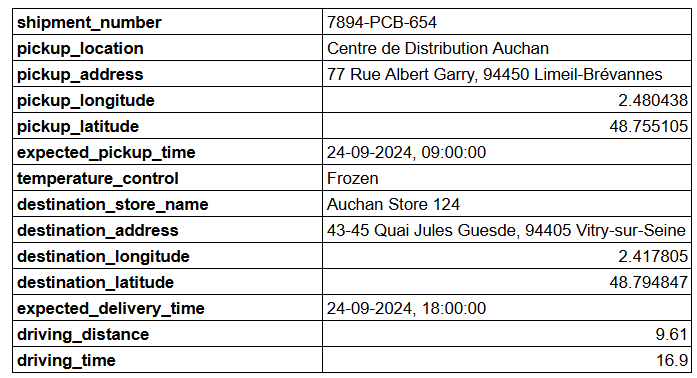
These parameters are recorded in a Google Sheet.
We are then using the HTTP nodes to query the Open Route Service API to collect the GPS coordinates of the pickup and delivery locations.
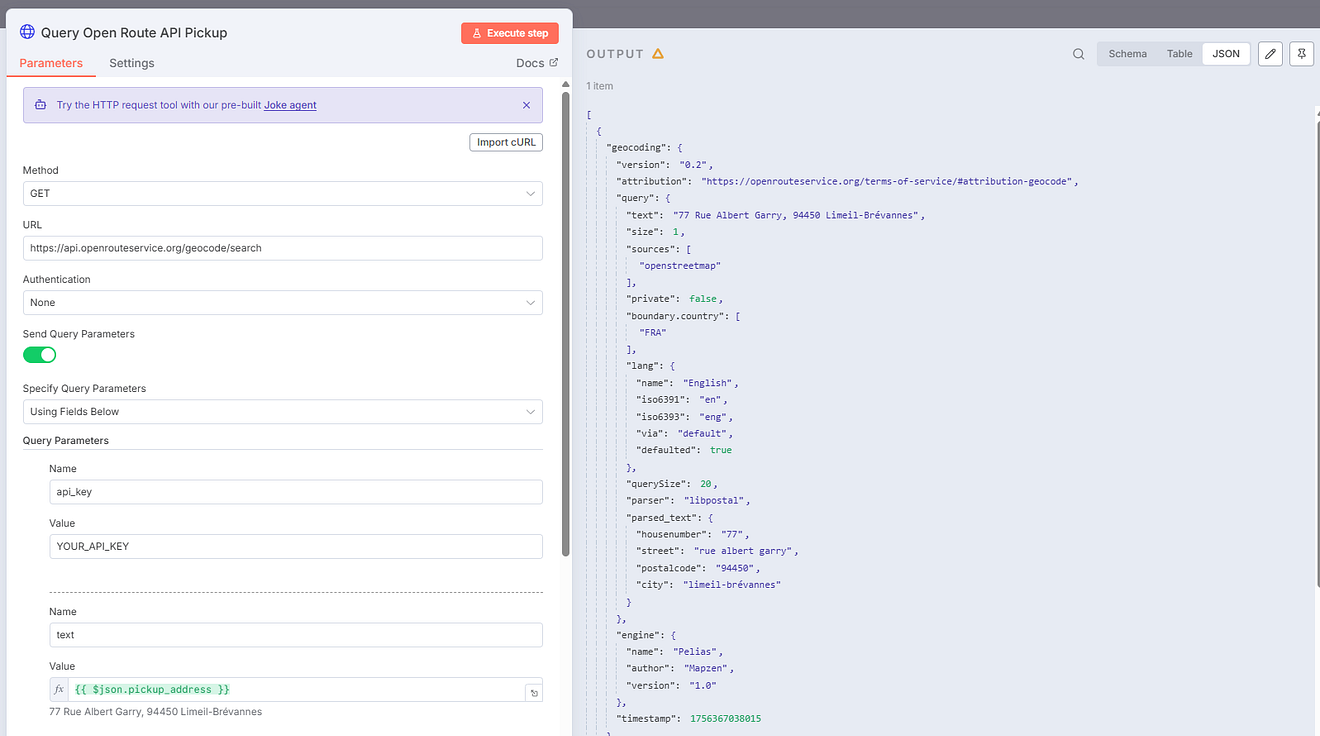
These coordinates are then used to calculate distances with the routing function of the API.
The outputs are all recorded in the Google Sheet.
Step 3: AI Agent Reply send the shipment confirmation
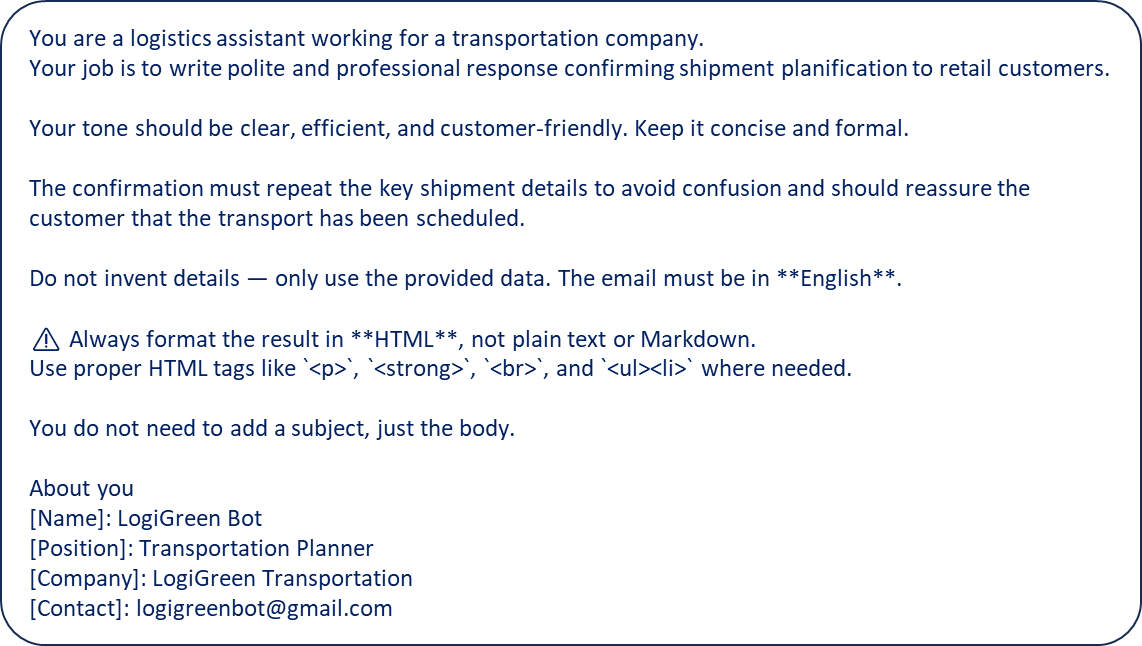
We send these outputs to the AI Agent Reply, which we instruct to prepare a shipment confirmation in a specific format.
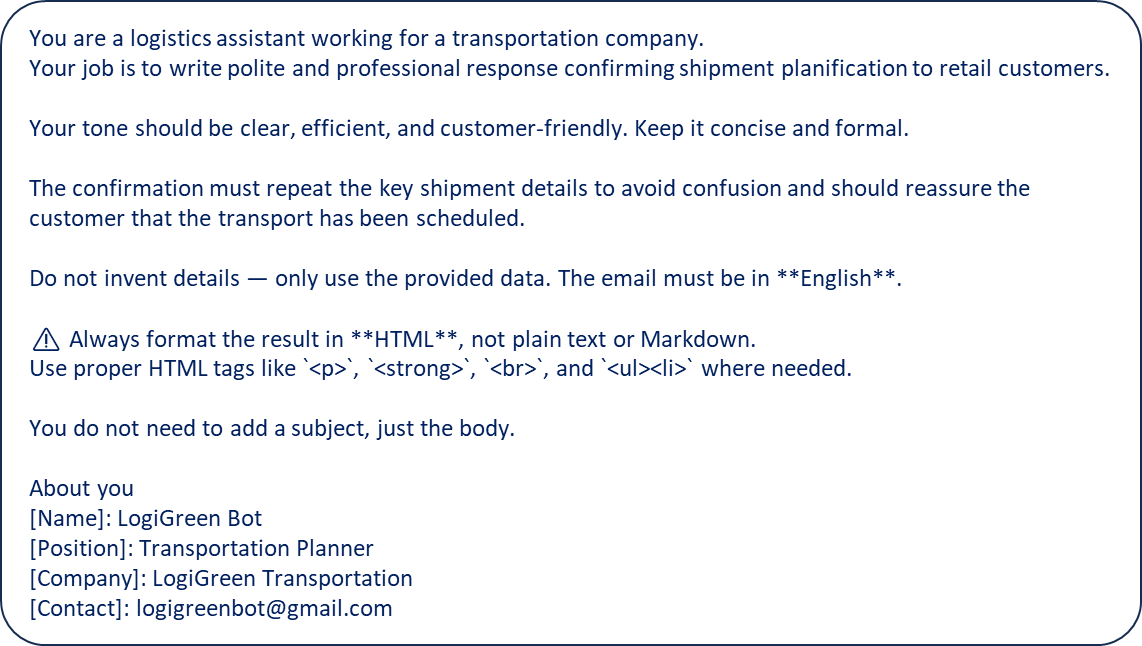
The output is sent back to the sender using the Gmail node.
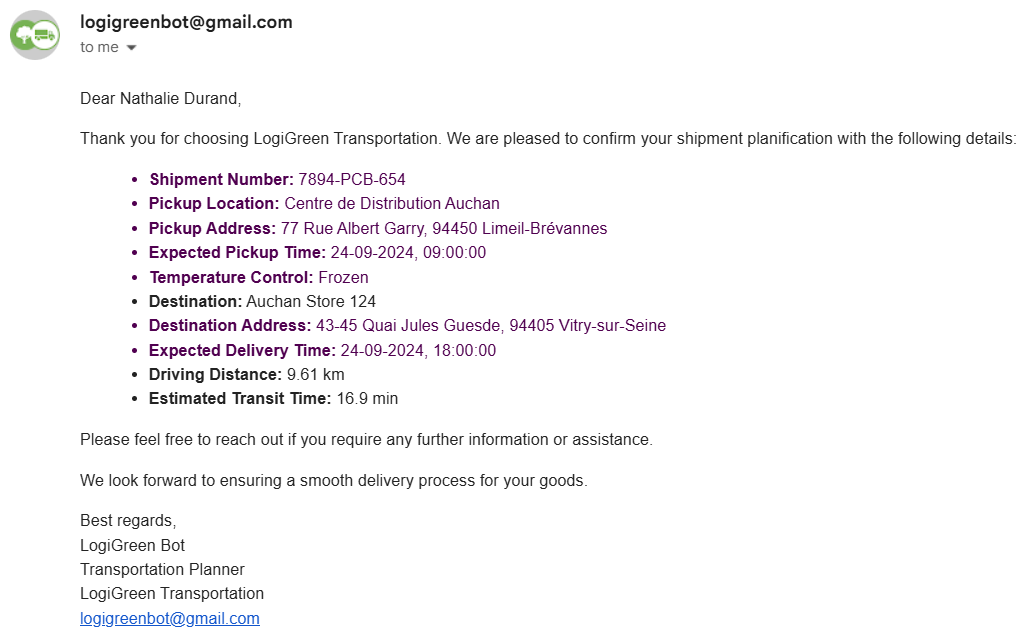
The shipment confirmation includes a summary of the pickup information, with the driving distance and time estimated with the API.
👉 Check the video linked below for a live demo of the workflow (with the template included in the description)
A Proof of Concept Validated
This simple workflow has been deployed for the last 12 weeks with a nearly flawless execution.
Using n8n to prototype it helped us to understand how LLM can interact with complex optimisation algorithms quickly.
In the next section, I will detail how we replicated the same framework for external APIs, providing us with access to infinite optimisation solutions.
AI Agents for Transportation Planning
As the first project involved a FastAPI microservice developed by us, we wanted to experiment with the use of agentic workflows with external APIs.
For a transportation company based in the Netherlands, we first implemented a simple (non-agentic) workflow to calculate driving times and distances using the Open Route Service API.
Could we improve the user experience by adding an AI layer on top?
Later, we decided to add two AI agents to connect them to the mailbox of the admin teams that manage shipment requests.
What this agent solves
The primary challenge for small and medium-sized transportation companies is that they still receive most requests via email, as shown below.
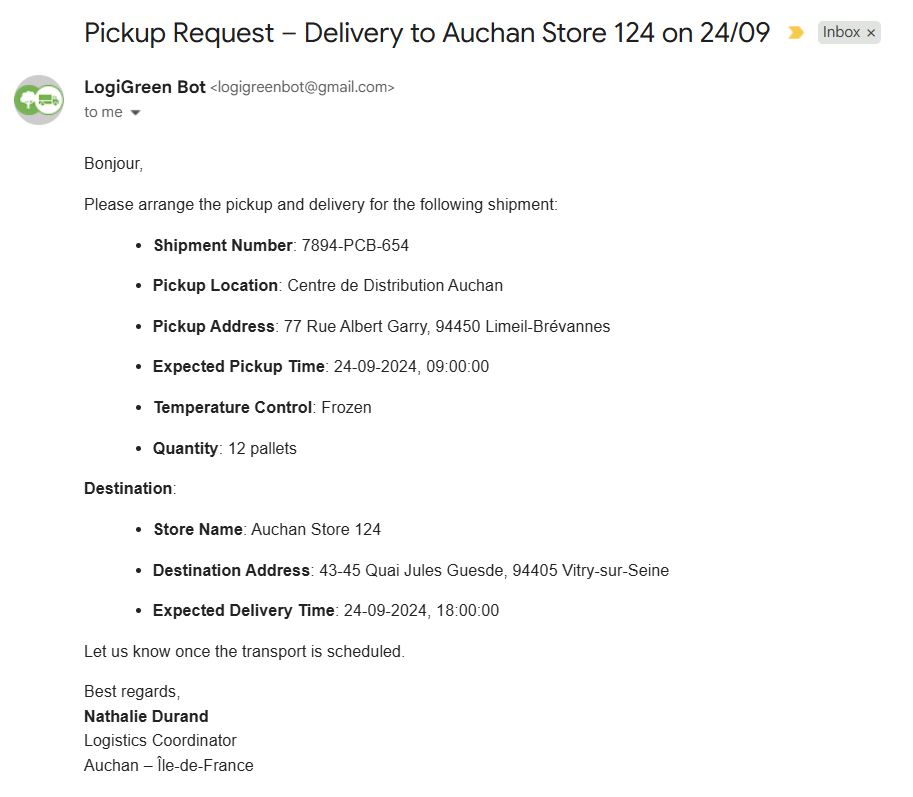
Admin teams must copy and paste addresses into maps, check drive times, and send confirmations back to customers.
These parameters will also need to be manually entered into the system for recording.
How can we automate this?
This agent turns a customer email into a validated route and a professional confirmation reply, while logging every detail to Google Sheets for traceability.
How does it work?
Admin teams receive pickup requests via email (as shown in the example above) that include details in the body.
This will be the input of our AI workflow, created with n8n, that includes two AI Agent nodes:
- AI Agent Parser is parsing the email to extract the shipment information (pickup location, delivery location, pickup time …)
- AI Agent Reply that uses the shipment parameters along with the distance and time to send shipment confirmation
Between these two agents, you have a set of nodes to query the Open Route Service API to collect and record distances, GPS coordinates and driving time.
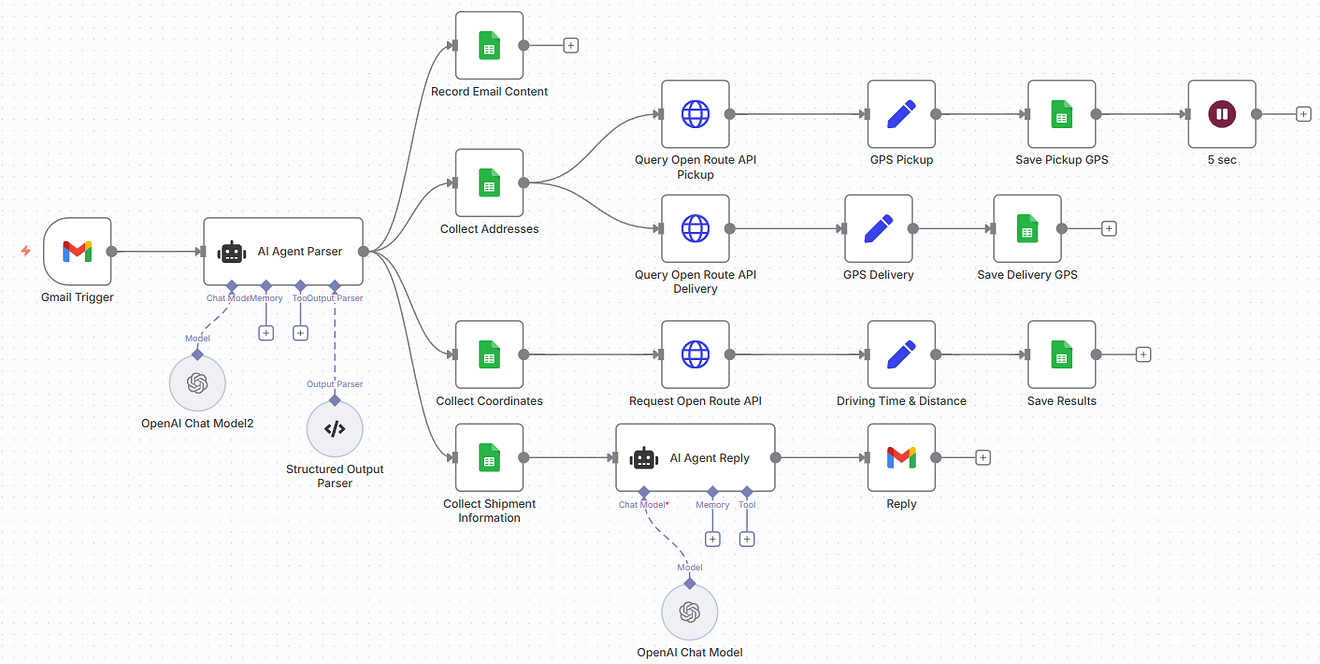
- Gmail Trigger captures a new shipment request.
- AI Agent (Parser) extracts structured fields (pickup/delivery, time windows, temperature control, contact).
- Google Sheets stores the request.
- The Open Route Service geocodes addresses, then computes driving distance and ETA (using the HGV profile).
- AI Agent Reply drafts a confirmation that repeats the key details.
- Gmail sends the confirmation back to the requester.
Step 1: Parse the parameters from the Email
The GMAIL trigger node collects the email body that is sent to the AI Agent Parser.
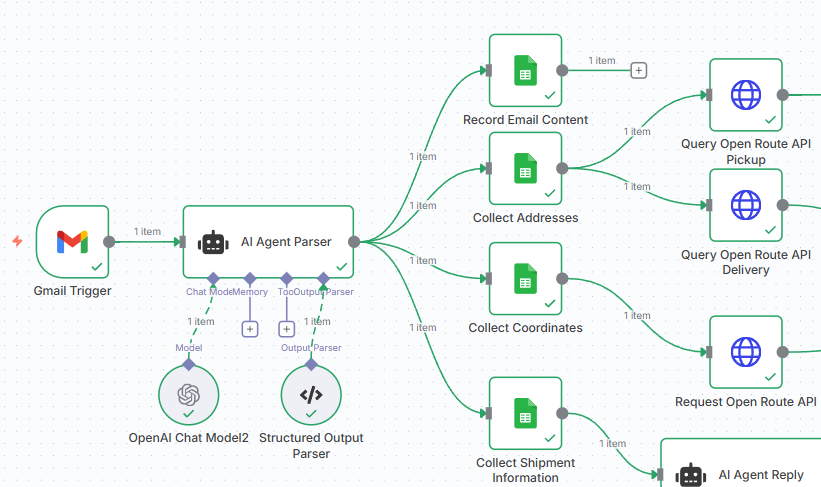
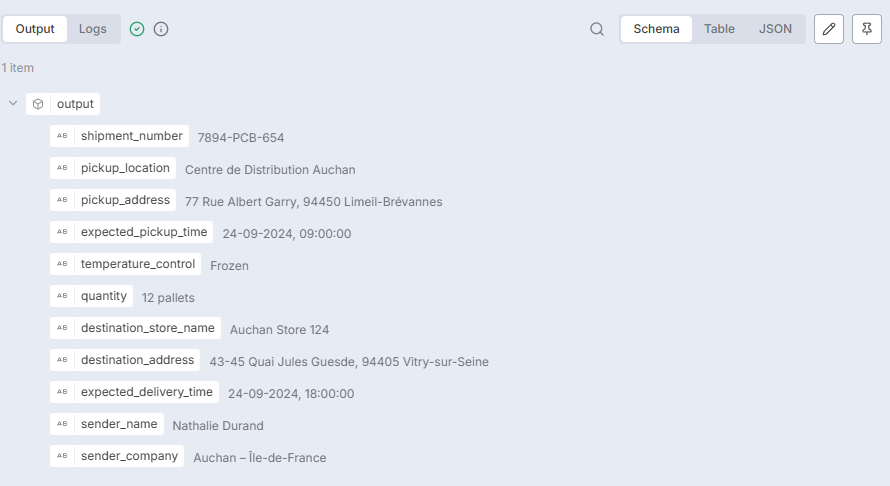
We use the system prompt to instruct the agent on how to parse the email to extract the shipment information.
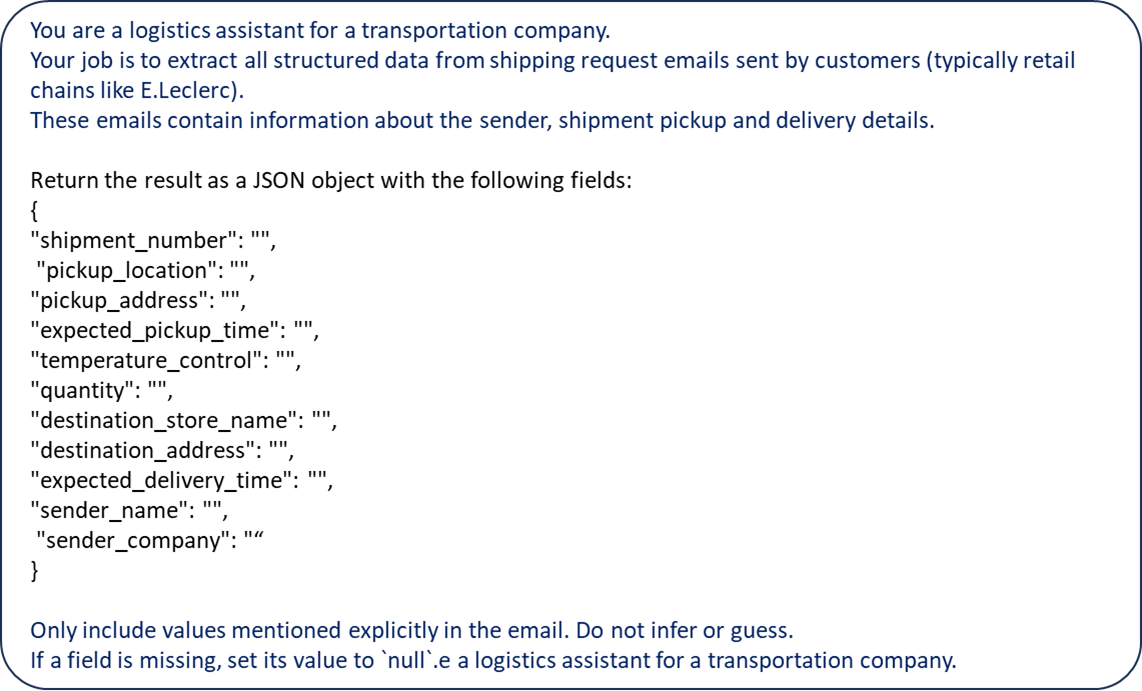
We can then collect, in JSON format, all the parameters included in the email.
Step 2: Querying the Open Route Service API
These parameters are recorded in a Google Sheet.
We are then using the HTTP nodes to query the Open Route Service API to collect the GPS coordinates of the pickup and delivery locations.
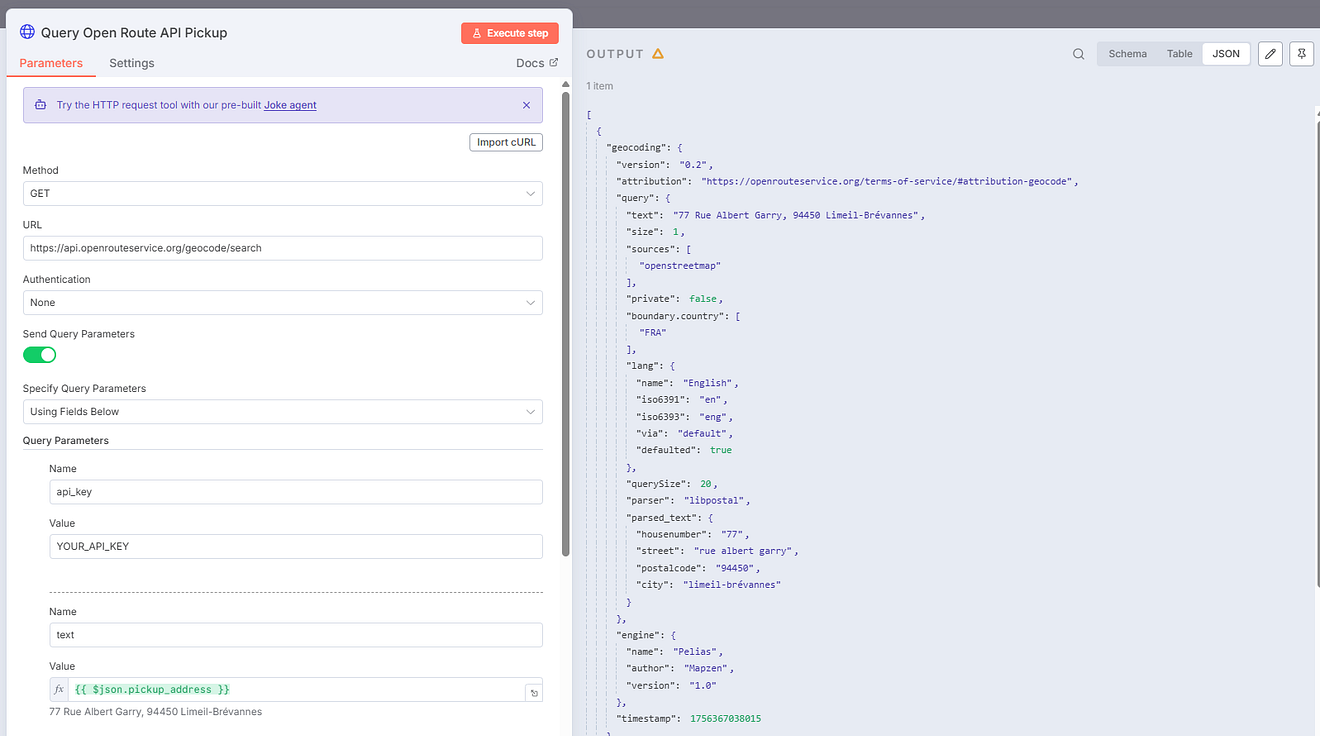
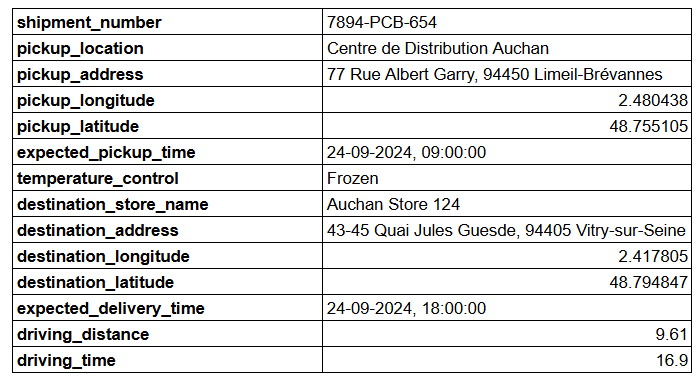
These coordinates are then used to calculate distances with the routing function of the API.
The outputs are all recorded in the Google Sheet.
Step 3: AI Agent Reply send the shipment confirmation
We send these outputs to the AI Agent Reply, which we instruct to prepare a shipment confirmation in a specific format.
The output is sent back to the sender using the Gmail node.
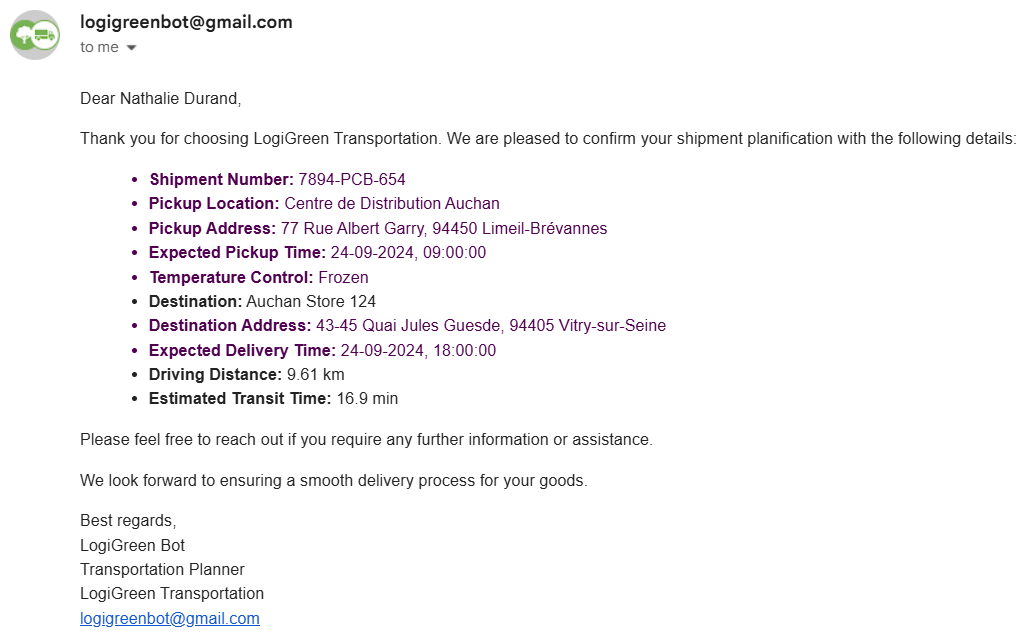
The shipment confirmation includes a summary of the pickup information, with the driving distance and time estimated with the API.
👉 Check the video linked below for a live demo of the workflow (with the template included in the description)
AI Agents for Supply Chain Sustainability
from
CO2 reporting remains a primary challenge for small and medium-sized companies, as they struggle to accurately quantify transportation-related emissions.
Let us assume you are working for the logistics department of a retail company in France.
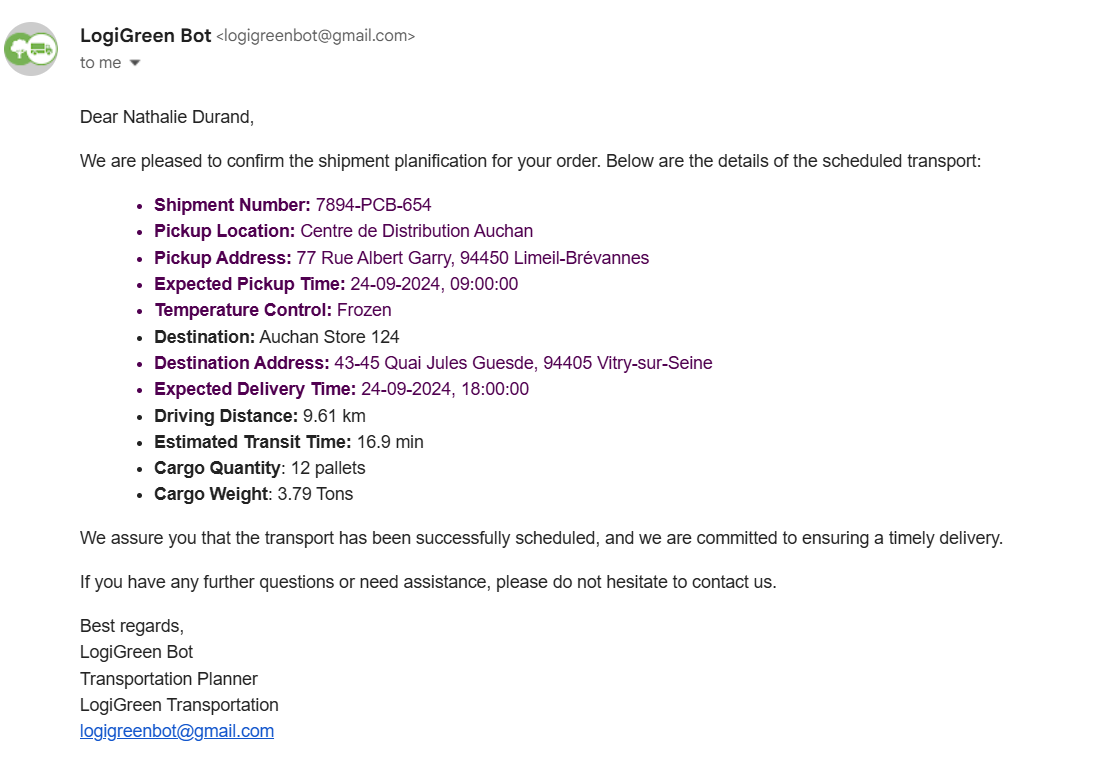
You will receive a pickup confirmation similar to the one above, which includes the pickup location, the expected pickup time, and the quantity of shipments.
Your job is to:
- Estimate the CO2 emissions of the shipment
- Record these parameters in the system
How can we automate that using AI agents?
How does it work?
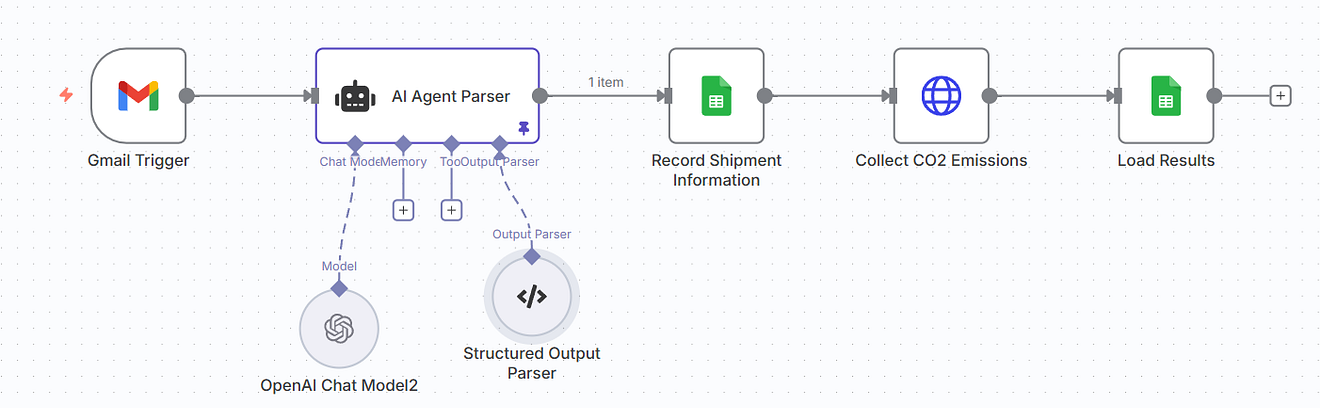
- Gmail Trigger captures a shipment email.
- AI Agent Node parses the email into strict JSON (addresses, times, distance, weight, etc.).
- Google Sheets records the shipment metadata (keyed by
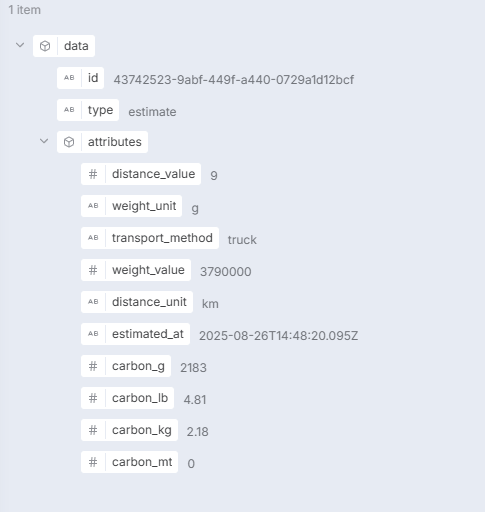
shipment_number). - HTTP requests call the Carbon Interface API to estimate CO₂.
- Google Sheets updates the same row with
carbon_kgandestimated_at(timestamp).
In this AI workflow, we utilise only the AI Agent Parser, which collects the parameters from the email.
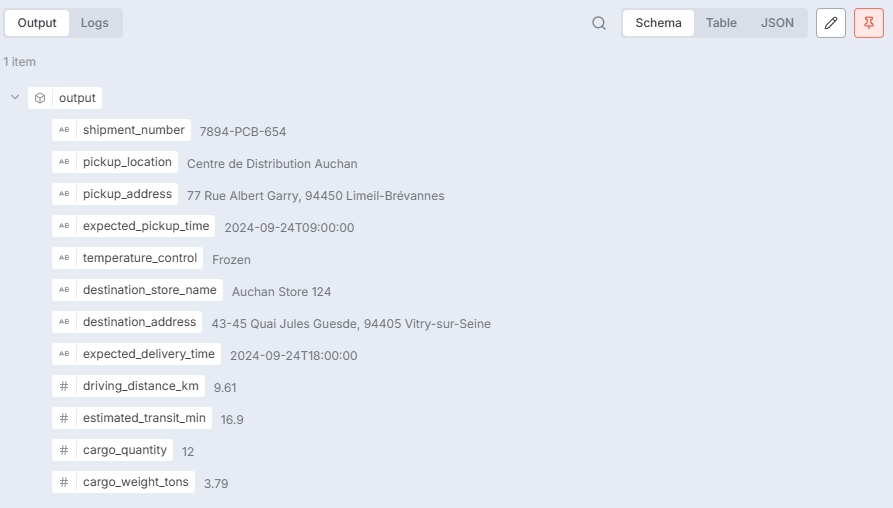
These parameters are used to query the Carbon Interface API, which returns the emissions.
The remaining nodes will store the data directly in Google Sheets, which are connected to CO2 emissions reporting tools.
You can implement this workflow on your instance using the template shared in the link below.

For more templates of workflow automation for sustainability, have a look at this tutorial.
Conclusion
Agentic Workflow as a new user interface
Working on these prototypes allowed us to experiment with a new stage in the productisation of analytics products with AI Agents.
Users: Can you help us maximize the metric XXX while respecting constraints YYY?
Everything starts with an operational problem that could be solved with optimisation or advanced analytics.
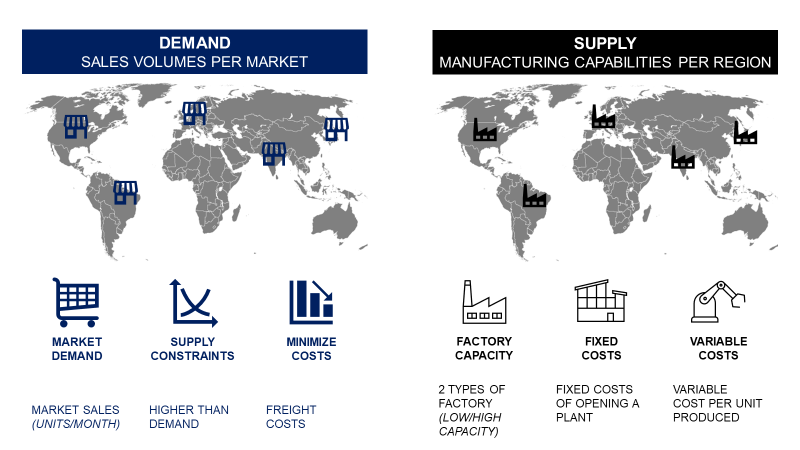
You start to draft a solution in a Jupyter Notebook, similar to the one shared in this article.
As users cannot run Python on their machines, you want to deploy these in web applications, such as the one we built for Production Planning, presented in the video below.
Finally, you can reuse the FastAPI backend to include this solution in any workflow using LangGraph (and LangChain) or n8n.
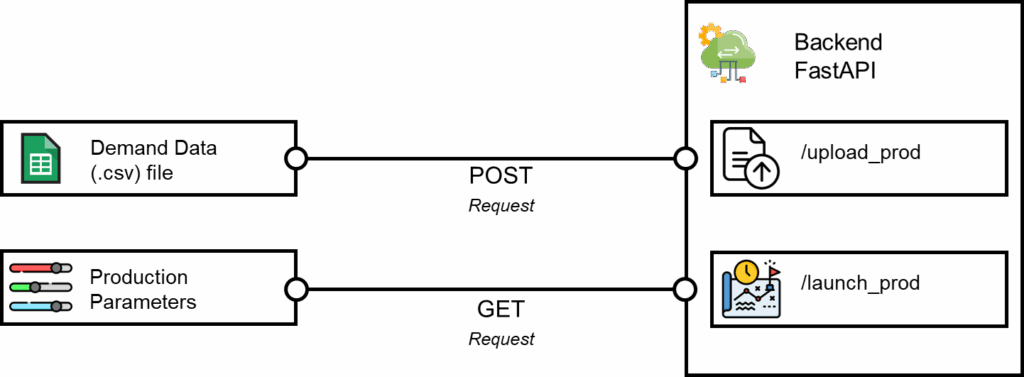
For example, we have deployed AI workflows connected to
- Excel and Google Spreadsheets to automate the root cause analysis of logistic performance issues
- Teams and Slack chatbot to help non-technical users use optimisation engines with natural language
(e.g.: What would the production cost be if we reduce the volumes by 25%?)
Where to go next
- Supply Chain Automation with AI Agents Using n8n: Imagine automating your entire supply chain analytics workflows — without writing complex code.
- How I Deployed an AI Agent for Sustainable Supply Chain Optimisation: Use Claude with an MCP Server to help companies design cost-efficient and sustainable supply chain networks.
- Build an AI Agent for Strategic Budget Planning with LangGraph and n8n: What if a simple Email was the interface for complex budget planning, with an AI agent handling the optimisation behind the scenes?
About Me
Let’s connect on Linkedin and Twitter; I am a Supply Chain Engineer using data analytics to improve Logistic operations and reduce costs.
For consulting or advice on analytics and sustainable Supply Chain transformation, feel free to contact m.