Excel Automation Tools for User-Friendly Reports with XlsxWriter
Automate spreadsheet creation with Python by writing explicit Excel formulas that any user can read.

The main issue you may face with an Excel automation script written in Python and pandas is the experience of users with no programming skills.
Indeed, your tool can be seen as a black box that takes data from an Excel file, processes it on the back-end, and exports it to another Excel file.
Some users cannot trust a report if they can’t access and modify the formula used to populate the results.
Therefore, replacing excel with python can impact the user acceptance of your solutions.
In this article, I propose an alternative to overcome this problem with the Pythonanalyse library xlswriter.
💌 New articles straight to your inbox for free: Newsletter
Scenario
You are a data analyst in a fashion retail company in charge of sales reporting.
Reports are generated by the system that manages the point-of-sale systems in stores.
In these reports, you have
- Sales quantity in pieces
- Items code with a total of 50 items
- Date and week covering a full year
Task
For reporting purposes, you need to process these reports and map the dataset with additional features that will be used to analyse, sales trends.
These additional features are linked with the item code
- Item Family: Leather Goods, Accessories, Ready-to-wear or Others
- Scope: a boolean value to inform if the item is in the scope of analysis
Objective
Since you need to perform this task more than 100 times per month, you are looking for a solution to automate the process.
Solutions
Initial solution using Python Pandas
Initially, you built a Python solution that automated processing using pandas.
Data is imported from several Excel files using Pandas, processed by your script and exported to another Excel file.
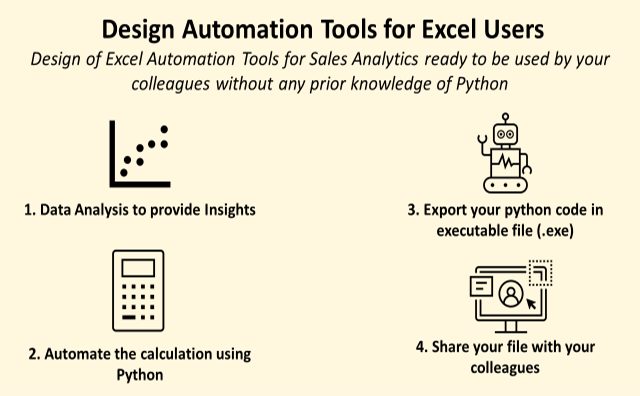
This script was converted to an executable file (.exe), so your colleagues can use it without your support.`
- Design and test your Python script
- Use PyInstaller to export your Python script to an executable file
- Share your .exe file (with detailed instructions) with your colleagues
Issues with user acceptance
Some users access the formula used to process the data.
Hello Samir, why can’t we see the formulas in the final report?
Are you sure that you are taking the right columns?
This issue raised concerns among your colleagues, who questioned the tool's accuracy because they couldn't verify it.
New solution with xlsxwriter
The idea is to use the Python library xlsxwriter to perform the calculation in the Excel file.
You can write formulas in Excel cells that can be read (and modified) by the users of the output file.
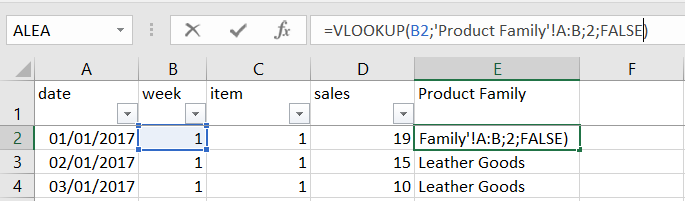
Thus, you retain Python's automation capabilities while providing greater visibility to users who are only familiar with Excel.
Implementation
If you have a look at the documentation of xlsxwriter, you will find several methods to create formulas in Excel cells.
You can install this library using Pip
pip install xlsxwriterYou can write formulas applied to a single cell,
And also apply your formula to an array,
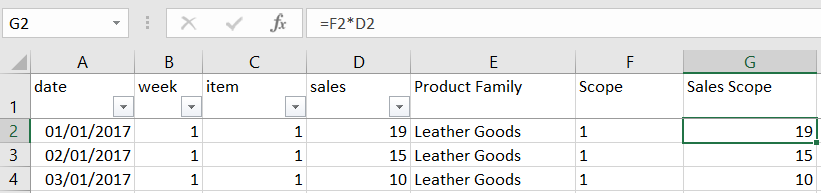
You can then build a solution for our easy processing task
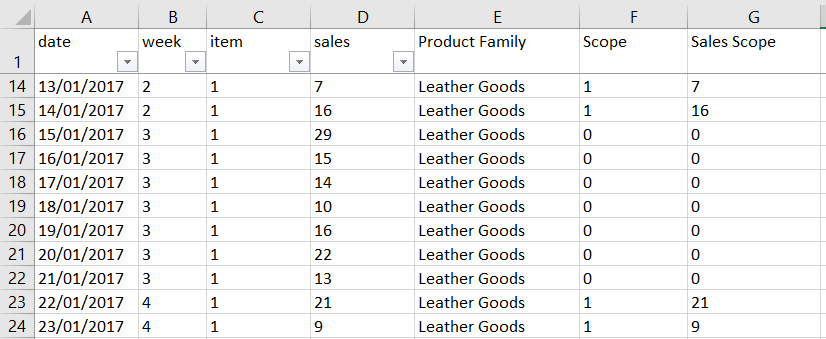
The three additional columns are generated using Excel formulas that are visible in each cell.
Conclusion
We have addressed the need for end-user visibility while preserving Python's automation capabilities.
What about the speed?
However, because of the structure of the library and the computing power needed to create formulas in an Excel file, you will lose processing speed.
Are there any limitations?
Beyond the limitations of Excel formulas, you also have to cope with the limited functions of the xlsxwriter.
For instance, you cannot build pivot tables with it.
For advanced calculations and processing, you will need to educate your users and provide transparency to build trust.
Have you heard about n8n automations?
With the recent trend of generative AI, I have outsourced this kind of automation to AI workflows.
They can provide explainability to non-technical users and expand the possibilities for automation.
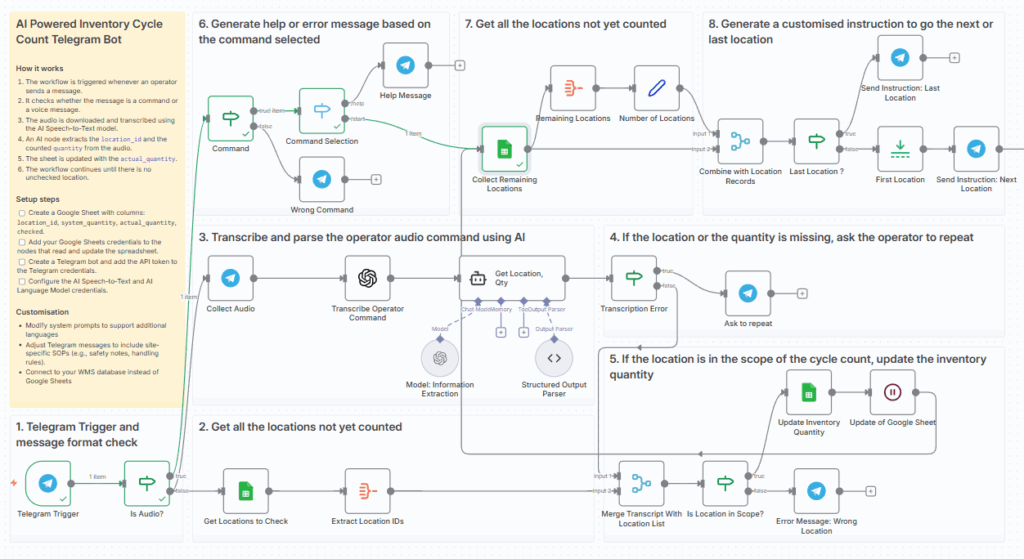
This can be developed with no-code solutions like n8n.
The advantage is to have something that teams can understand and maintain.
For more details, check this tutorial.
Where to go next
- Automate Excel Reports with Python: The Four Patterns That Cover Most of the Work: Four patterns to automate the Excel reports an operations team rebuilds every week
- Build Excel Automation Tools with Python: Design of Excel Automation Tools for Sales Analytics ready to be used by your colleagues without any prior knowledge of Python
- Animate your Python Graphs with Pillow: Animate your Python plots with the Python library Pillow to bring life to your insights.
About Me
Let’s connect on LinkedIn and Twitter. I am a Supply Chain Engineer who is using data analytics to improve logistics operations and reduce costs.
If you’re looking for tailored consulting solutions to optimise your supply chain and meet sustainability goals, feel free to contact me.