Automate Video Editing with Python
Automate the editing of explainer videos to create shorts with text-to-speech comments for the training of warehouse operators
Imagine that you are an operational manager in the logistics department of an international fashion retailer.
To support the onboarding of new operators and administrative staff, you would like to prepare training videos.

Your colleague has shared an explainer video with you that introduces all the processes of warehouse receiving.
To animate your sessions, cut this video into short clips that explain each process.
In this article, we explore a method to automate these simple video editing tasks using the Python library Moviepy.
💌 New articles straight to your inbox for free: Newsletter
Problem Statement
Training Material
In this video, you have a complete presentation of the processes involved in receiving products in a Warehouse.
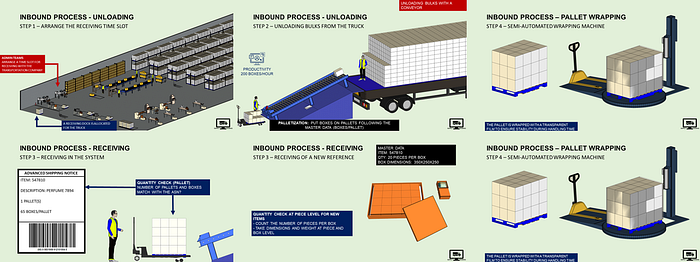
Therefore, you would like to use this video that lists the different processes as training support for your onboarding sessions:
- Total Duration: 00:03:18
- 18 sections, including the intro and outro
- Background music but no background voice
Objective
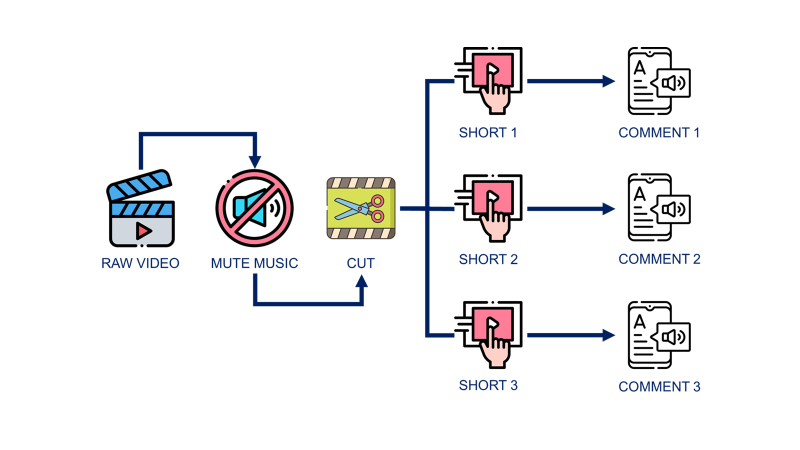
You want to cut the video, remove the background music and create shorts with audio comments.
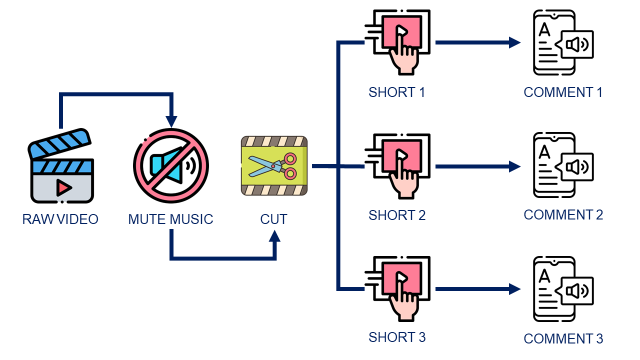
The idea is to build an automated workflow using Python that will
- Load the original video
- Remove the background music
- Cut the video into several shots that focus on different processes
- Add audio comments generated with a Text-to-speech solution
Solution
There is a solution using the Python library Moviepy.
Step 1: Loading the video
We start by loading the .mp4 file of the original video that you can find on my YouTube Channel.
Step 2: Cut the video
As you want to focus on some specific processes, you will not use the entire video.
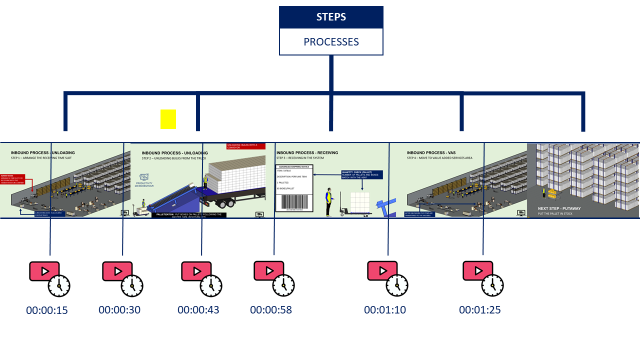
Therefore, we need a method to cut the video at specific points to generate short clips that illustrate a specific process.
Function: Convert to seconds
💡 Insights
We’ll need this function later when we start to cut the video.
Action: Cut the video
📹 Result
💡 Insights
You have a short video clip with the background music cut from the original video at the right timestamps.
Step 3: Remove the sound
You would like to play videos without sound, so you want to take your shorts off.
📹 Result
💡 Insights
You can also apply a fraction of the volume using .volumex(fraction) that can be lower than 1(reduction) or higher than 1 (increase)
Step 4: Combine two shorts
You have cut two videos.
Would you like to play them in sequence?
There is a Moviepy function for this.
📹 Result
Step 5: Stack the videos
Would you like to show several processes simultaneously?
You can stack the videos on the same screen.
📹 Result
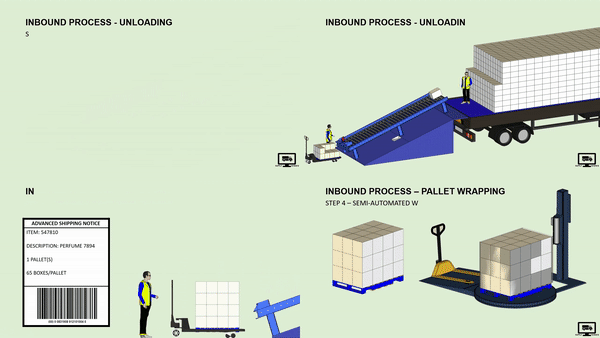
Step 6: Add some lag
If you want to stack the videos with a 5-second lag between each, it can be done.
(I have no idea why someone would do that, but why not!)
📹 Result
Final Step: Add Text-To-Speech Comments
We have generated comments using a Text-to-speech API. Can we add them to the video?
The answer is yes!
📹 Result
💡 Insights
Google TTS (free tier) is very bad! Do you know a better one at a reasonable price?
Conclusion
For sure, we are far from Adobe Premiere or Final Cut Pro. But it’s doing the job if you need simple edition tasks.
Moreover, I have shared with you only a fraction of what the library can do. I strongly suggest having a look at the documentation for more insights.
You are now ready to design training materials or start your fully automated TikTok channel.
Where to go next
- Automate Excel Reports with Python: The Four Patterns That Cover Most of the Work: Four patterns to automate the Excel reports an operations team rebuilds every week
- Automate PowerPoint Slides Creation with Python: Boost your Productivity with an Automated Tool for the Creation of Supply Chain Operational PowerPoint Reports with Python.
- Animate your Python Graphs with Pillow: Animate your Python plots with the Python library Pillow to bring life to your insights.
About Me
Let’s connect on LinkedIn and Twitter. I am a Supply Chain Engineer who is using data analytics to improve logistics operations and reduce costs.
If you’re looking for tailored consulting solutions to optimise your supply chain and meet sustainability goals, please contact me.