Automate Flash Cards Creation for Language Learning with Python
My experience using Python to automate the process of flash card creation to support my long journey of learning mandarin as a native French speaker.
Learning a language can be a long journey, so staying motivated and setting clear goals along the way are essential.
Because Mandarin uses a pictorial system of writing words and sounds called hanzi 汉字, it makes the journey even more challenging for any learner without a background in a similar language.

In my quest for Chinese fluency, flashcards have been my best ally in improving my reading and pronunciation.
In this article, I will share my experience using Python to automate flashcard creation to support my learning journey.
💌 New articles straight to your inbox for free: Newsletter
Context
I am a French guy who moved to China to study engineering in a two-year double-degree program.
Finally, I ended up staying for more than 6 years, and my main challenge was to learn Mandarin for daily life and work.
前车之鉴:lessons drawn from others’ mistakes
The main mistake I did when I started to learn Mandarin was not following the advice of intelligent people that were promoting the use of flash cards.
Do you remember as a kid when one of your parents or tutor was holding your book to help you prepare for tomorrow’s history test?
She was asking you questions related to the lesson:
- If you answer well, she can consider that you are ready for the test.
- If you make mistakes, she will ask you to read the lesson again and come back when you’re ready.
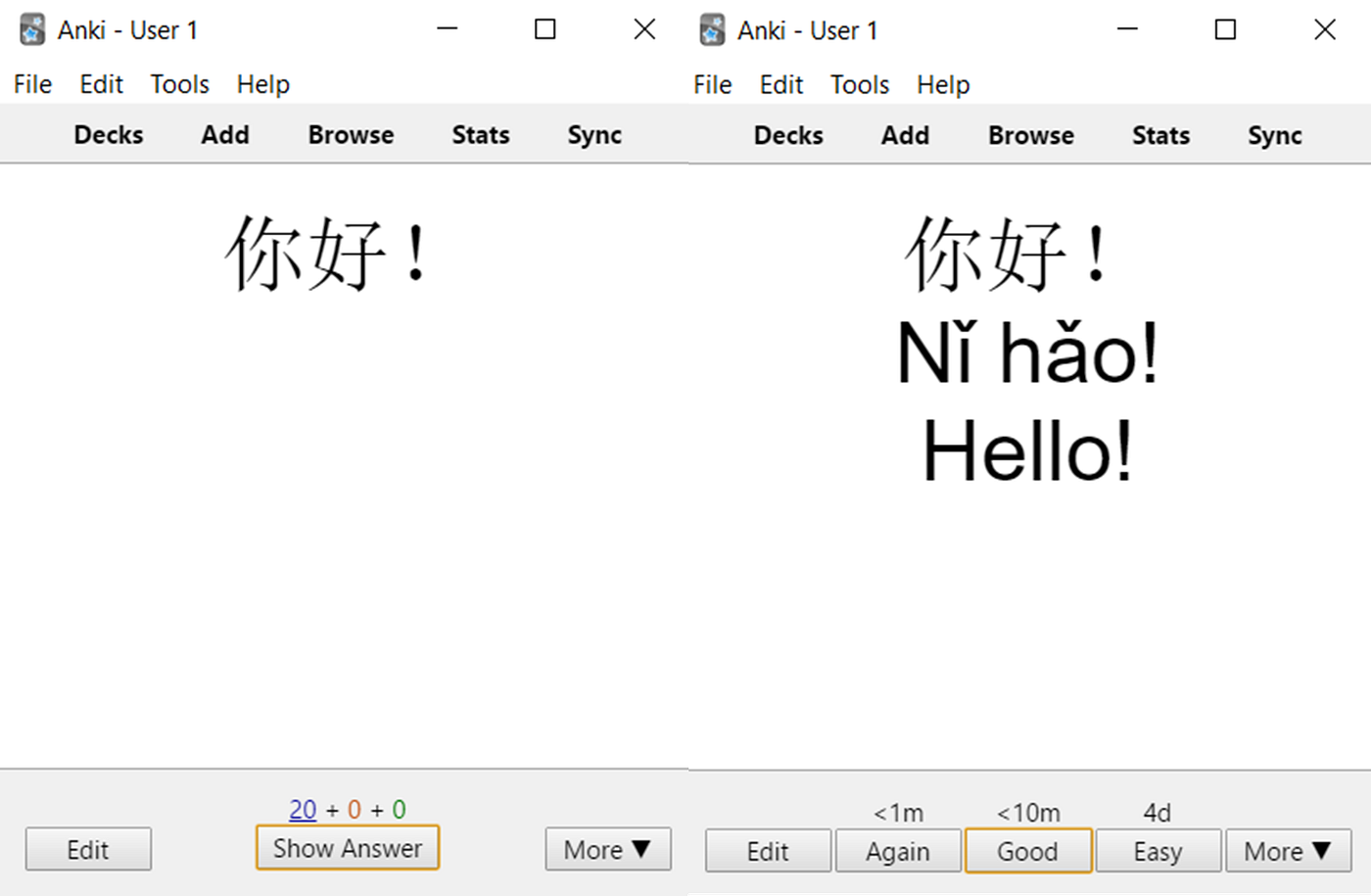
Now there is an open-source app for this, and it’s called Anki.
A personal teacher on your phone
In the picture above, you can find an example of the card to learn how to say ‘Hello!’ in Mandarin.
Step 1: It first shows you the word in the Chinese character Hanzi
Step 2: It shows you the answer with:
- The pronunciation using the romanisation system pinyin: nĭ hăo
- The translation in English: Hello!
- The oral pronunciation with an mp3 sound

Step 3: Perform your self-assessment
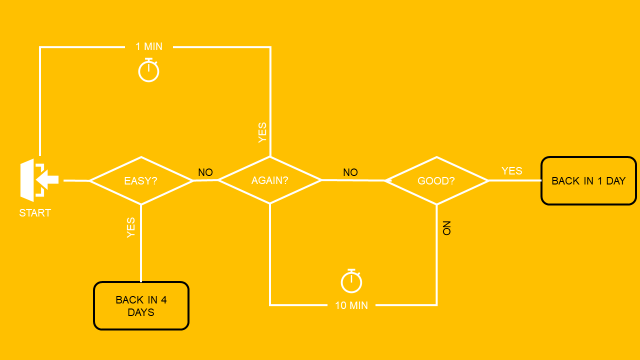
- If you guessed well, press ‘Good’: the card will reappear in 10 min
- If you think that it’s ‘Easy’,To support your learning journey, you want to feed your Anki deck with thousands of cards and practise for 2 hours per day during your commute and downtime Anki will wait 4 days to ask you again
- If you did not guess well, press ‘Again’: the card will reappear shortly
Objective
To support your learning journey, you want to feed your Anki deck with thousands of cards and practise for 2 hours per day during your commute and downtime.
Solution
In this section, I will explain how to use Python to build these cards with…
- Common words or sentences for daily life or work
- Add the phonetic transcription using a Python library
- Add an audio transcription using Google TTS API
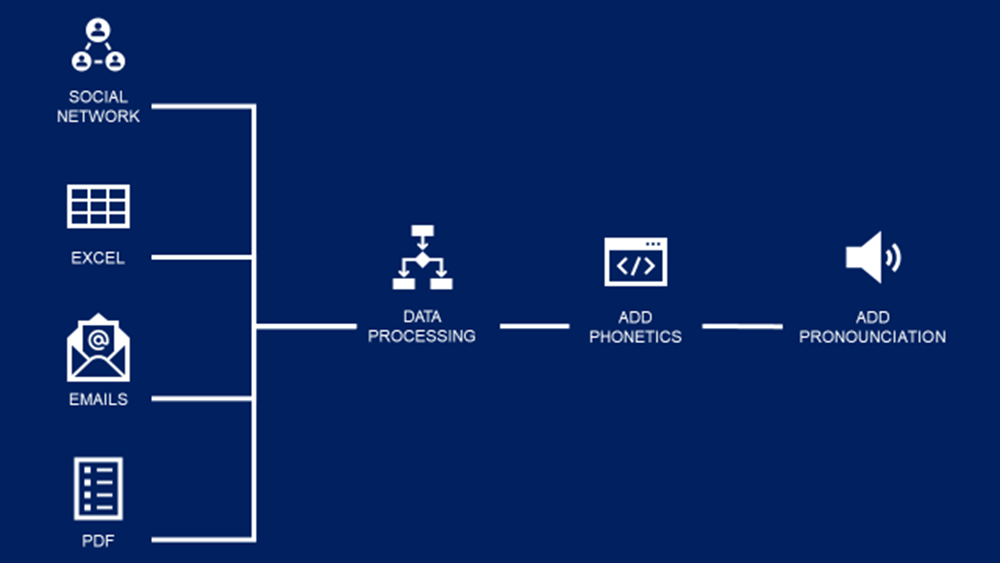
This framework can be applied to any language, not only Mandarin Chinese.
Build Your Vocabulary List
As a foreigner working in China, my main priority was to develop a basic vocabulary to communicate with my colleagues.
Read emails with pywin32
Because my first objective was to read emails in Mandarin, I planned to extract the most frequently used words in the emails in my Outlook mailbox.
Using the piece of code below, you can extract the body of all your emails and store them in a list.
Extract keywords from pdf reports
Some reports and documentation I received from suppliers can be a good source of technical words.
Therefore, I have written this simple piece of code to extract text from any PDF report.
Other Sources
Another main source was the monthly financial reports in Excel that can be processed using the Pandas library.
Final Results
After processing, I get a list of words like the one below

Add the phonetic transcription
In order to practise your pronunciation and make the right use of the tones, you need phonetic transcription.

For Mandarin, I use the jieba library, which converts Chinese characters into phonetic transcriptions (pinyin).
You can find a library for your language.
For instance, you have fonem for French and epitran for Italian.
Add the pronunciation
To improve your speaking, add pronunciation to each card.
There is a solution for this using the gtts library.
This is a Python library and CLI tool to interface with Google Translate’s text-to-speech API.
Conclusion
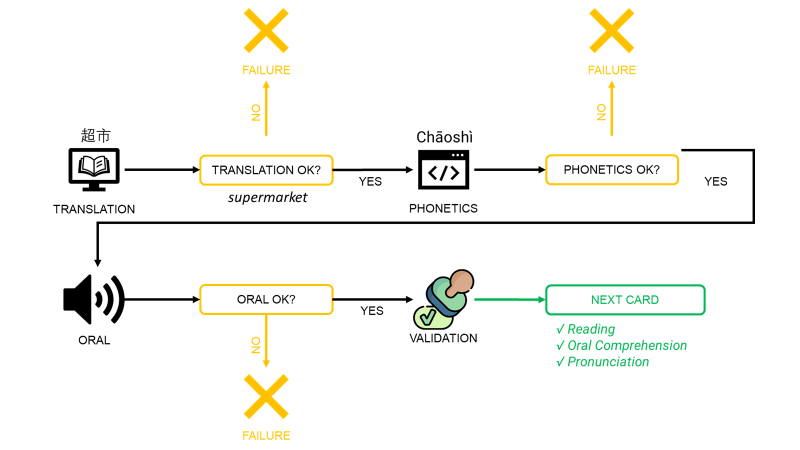
Now you have a list of words or sentences with English translations, phonetic transcriptions, and a short mp3 audio recording of the pronunciation.
These cards can be used to practise your…
- Reading Comprehension using the translation
- Pronunciation using the phonetic transcription
- Oral Comprehension using the short audio
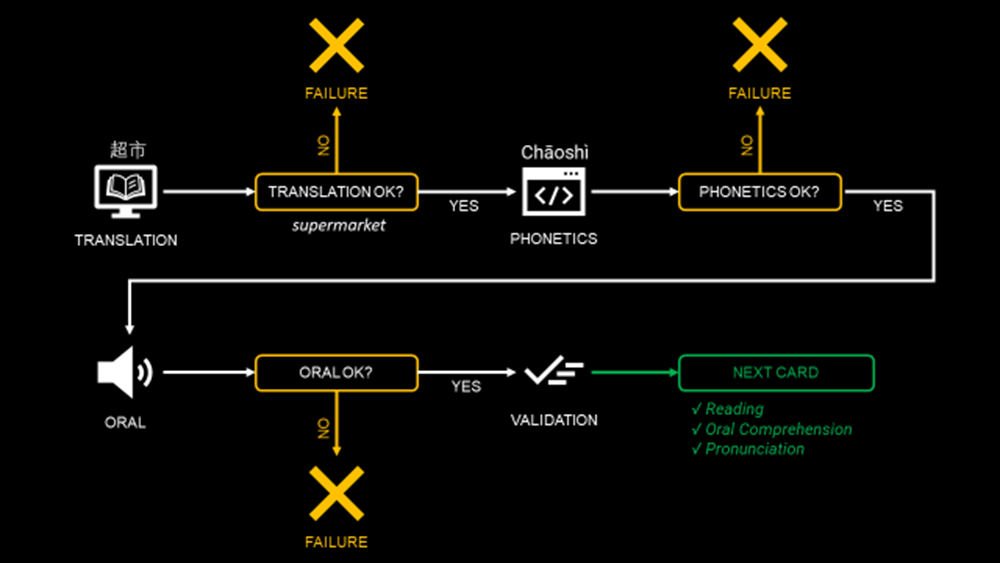
Apply the process presented in the visual above, and I promise you will see improvements in your language mastery with the help of Python!
Have you heard about n8n?
I decided to improve the solution using generative AI models with n8n.
The idea is to enrich the content without effort.
For more details, here is a quick presentation of this advanced solution
About Me
Let’s connect on LinkedIn and Twitter. I am a Supply Chain Engineer who is using data analytics to improve logistics operations and reduce costs.
If you’re looking for tailored consulting solutions to optimise your supply chain and meet sustainability goals, please contact me.